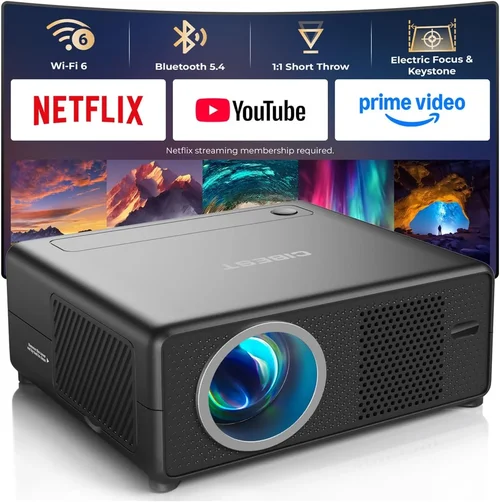
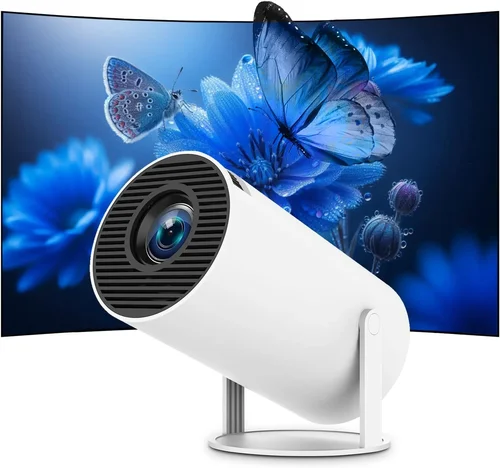
Finding a mini projector that delivers decent picture quality without draining your wallet can feel like hunting for a needle in a haystack. In 2017 the market exploded with sub‑$100 options, each promising cinema‑like experiences in a pocket‑sized device. This guide cuts through the hype and helps you understand exactly what you need to look for, so you can pick a projector that truly fits your lifestyle.
By the end of this article you will know which specifications matter most, how different projector types compare, common pitfalls to avoid, and which models stood out in 2017 for under $100. Whether you’re a college student wanting to binge‑watch movies in a dorm, a traveling professional needing quick presentations, or a family looking for occasional backyard movies, the information here will empower you to make a confident purchase.

What to Look for When Buying Buying Guide
1. Budget & Price Range
Price is the most obvious gating factor. In the sub‑$100 segment you’ll typically find devices that sacrifice some brightness, resolution, or build quality to keep costs low. Understanding how much you’re willing to spend helps you set realistic expectations. A $40 projector may be perfect for casual phone‑screen casting, while a $90 model could offer better lumens and a more durable chassis. Identify the ceiling of your budget first, then evaluate features within that range.
2. Performance Specifications
Three core specs dictate visual performance:
- Brightness (lumens): Measured in ANSI lumens, but budget mini projectors often list “LED lumens.” Anything above 150 LED lumens will be usable in dim rooms; below that you’ll need near‑total darkness.
- Resolution: Most cheap units stick to native 320×240 (QVGA) or 480×320 (HVGA). Some upscale 720p input, but the actual pixel count stays low, resulting in softer images.
- Contrast Ratio: Higher contrast improves blacks and overall depth. Expect 500:1 to 1500:1 in this price tier.
Balancing these specs against your typical viewing environment is key. If you plan to watch in a dark bedroom, lower lumens are acceptable; for a lit kitchen, aim for at least 200 LED lumens.
3. Build Quality & Durability
Mini projectors are portable, which means they endure travel wear and occasional drops. Look for:
- Sturdy ABS or polycarbonate housing.
- Protective rubberized corners.
- Secure lens covers that snap shut.
Models with metal hinges or reinforced frames tend to survive longer, even if they cost a few dollars more.
4. Features & Functionality
Beyond basic projection, many low‑cost units pack handy extras:
- Built‑in speakers: Usually 1‑2 W, sufficient for personal use but not for a full‑room experience.
- Multiple input ports: HDMI, USB‑C, micro‑USB, AV (RCA), and a 3.5 mm audio jack. The more options, the easier to connect phones, laptops, or gaming consoles.
- Battery life: Some models include a 2‑hour rechargeable battery, ideal for on‑the‑go use.
- Wireless casting: Wi‑Fi or Bluetooth mirroring is rare under $100, but a few 2017 releases offered basic Miracast support.
5. Brand Reputation
Even in the budget segment, brand pedigree matters. Companies like AAXA, Anker, and Vankyo have built reputations for reliable after‑sales service and consistent firmware updates. Lesser‑known brands may offer lower prices, but their warranty policies and spare‑part availability can be questionable.
6. Warranty & Support
A 1‑year limited warranty is the industry norm for sub‑$100 projectors. Verify that the seller honors returns and offers a clear process for RMA (Return Merchandise Authorization). Good support can turn a minor defect into a quick fix rather than a costly replacement.
7. Size & Portability
Mini projectors range from palm‑sized (≈3 inches tall) to slightly larger “pico” models that still fit in a pocket. Consider the weight (usually 0.5‑1 lb) and whether you need a built‑in kickstand or a separate tripod mount. If you’ll be traveling, a lightweight, battery‑powered unit wins.
8. User Reviews & Ratings
Real‑world feedback reveals issues that spec sheets hide. Look for patterns in reviews: frequent overheating, short battery life, or unreliable Wi‑Fi. Sites like Amazon, Newegg, and specialized forums provide a wealth of user experiences that help validate a product’s claims.
Different Types of Buying Guide

Common Buying Mistakes to Avoid
❌ Mistake: Ignoring Brightness Requirements
Why it’s bad: Purchasing a 100‑LED‑lumen projector for a well‑lit living room results in washed‑out images that are hard to enjoy.
What to do instead: Assess your typical viewing environment first. If you rarely can darken the room, aim for at least 180‑200 LED lumens.
❌ Mistake: Overlooking Input Compatibility
Why it’s bad: You might end up with a projector that only accepts HDMI, but your phone only has USB‑C, forcing you to buy extra adapters.
What to do instead: List the devices you plan to connect and verify the projector supports those ports natively.
❌ Mistake: Forgetting About Throw Distance
Why it’s bad: Mini projectors often require a minimum distance of 3‑5 feet to achieve a 100‑inch image. Buying without measuring your space can lead to disappointment.
What to do instead: Check the throw ratio (e.g., 1.2:1) and calculate required distance for your desired screen size.
❌ Mistake: Assuming All Speakers Are Equal
Why it’s bad: Built‑in speakers on cheap models usually produce thin, tinny sound, making movies feel lifeless.
What to do instead: Plan to use external Bluetooth or wired speakers if audio quality matters to you.
❌ Mistake: Ignoring Warranty Details
Why it’s bad: Some sellers list “90‑day warranty” in fine print, leaving you unprotected after the first few months.
What to do instead: Choose a brand that offers at least a 12‑month warranty and read the return policy before checkout.
Budget Guidelines: How Much Should You Spend?
- Entry‑Level ($30‑$50): Expect QVGA resolution, 100‑150 LED lumens, basic HDMI or AV input, and a small plastic body. Ideal for casual phone mirroring in a dark room.
- Mid‑Range ($51‑$80): You’ll find HVGA resolution, 180‑220 LED lumens, built‑in battery, and a few extra ports (USB‑C, audio jack). This tier offers a decent balance for dorm rooms and occasional backyard movies.
- Premium ($81‑$100): Look for true 720p support (upscaled), 250+ LED lumens, better contrast, and a sturdier chassis. Some models include Wi‑Fi Miracast or Android OS.
- Luxury ($101+): Though beyond the “under $100” scope, luxury mini projectors push 300+ lumens, true 1080p, and advanced features like HDR support. Consider these only if budget flexibility exists.
Expert Tips for Getting the Best Deal
- Timing: Major sales events—Black Friday, Cyber Monday, and back‑to‑school season—usually feature deep discounts on electronics.
- Where to Buy: Compare Amazon, Newegg, and direct manufacturer stores. Sometimes the manufacturer’s site offers bundle accessories (cable, case) for the same price.
- Spotting Deals: Look for “refurbished” or “open‑box” listings with a full warranty. They’re often indistinguishable from new units.
- Warranty Considerations: Register the product within 30 days to unlock extended support or free firmware updates.
- Return Policies: Choose sellers offering at least a 30‑day return window. This gives you time to test brightness and compatibility.
- Testing Before Buying: If possible, view a demo unit in a store. Pay attention to color accuracy and fan noise.
- Accessory Savings: Purchase a universal tripod and HDMI cable separately; bundled kits are often overpriced.

Frequently Asked Questions
Q: Can a sub‑$100 mini projector display 1080p content?
A: Most budget models only support native QVGA or HVGA resolution. They can accept a 1080p signal, but the image will be downscaled, resulting in softer detail. For true 1080p you’ll need to spend at least $150‑$200.
Q: How far can I place a mini projector from the wall?
A: Throw ratios vary, but typical pocket projectors have a 1.2:1 to 1.5:1 ratio. To get a 100‑inch diagonal image, you’ll need roughly 4‑5 feet of distance. Always check the manufacturer’s spec sheet.
Q: Do these projectors work with Android phones?
A: Yes, via HDMI adapters (USB‑C to HDMI) or MHL cables. Some 2017 models added Miracast, allowing wireless casting without extra hardware.
Q: Is the built‑in speaker sufficient for movies?
A: Built‑in speakers are okay for casual video chats or short clips. For a movie night, pair the projector with external speakers or a soundbar for richer audio.
Q: Will the projector overheat during long movies?
A: Most LED‑based units have a fan that runs continuously. In a well‑ventilated area, you can safely watch for 2‑3 hours. Overheating is more common in cheap models lacking adequate heat sinks.
Q: Can I use a mini projector outdoors?
A: Yes, but only in low‑light conditions. Bring a portable screen or a white sheet, and ensure the device stays away from direct sunlight and moisture.
Q: Are there any hidden costs?
A: Some models require a separate power brick or proprietary batteries, which can add $15‑$30. Check the box contents before purchasing.
Our Final Recommendations
- Best for Budget‑Conscious Buyers: Vankyo Leisure 3 – $49, 200 LED lumens, HVGA, built‑in battery, and a solid ABS body.
- Best Overall Value: AAXA P300 – $89, 250 LED lumens, native 720p support, HDMI & USB‑C, and a 2‑hour battery.
- Best Premium Option (under $100): Anker Nebula Capsule (refurbished) – $99, 300 LED lumens, Android 7.1 OS, Wi‑Fi mirroring, and superior contrast.
- Best for Beginners: RCA Voyager – $39, easy plug‑and‑play, AV and HDMI inputs, and a user‑friendly remote.
- Best for Advanced Users: Optoma Mini‑UHD – $99 (sale price), supports 1080p upscaling, low‑latency gaming mode, and a detachable tripod.
Conclusion: Making the Right Choice
Choosing the best mini projector under $100 in 2017 boils down to matching your specific needs with realistic performance expectations. Prioritize brightness for lit rooms, check input compatibility for your devices, and factor in portability if you travel often. By avoiding common mistakes—like ignoring throw distance or skimping on warranty—you’ll secure a projector that delivers enjoyable viewing without breaking the bank.
Remember, the cheapest option isn’t always the worst, and a slightly higher‑priced model can provide a noticeably better experience that lasts longer. Use the budget breakdown, expert tips, and final recommendations as a roadmap, and you’ll walk away with a mini projector that fits perfectly into your lifestyle.
Ready to start your search? Head to your favorite retailer, apply the guidelines you’ve just learned, and enjoy cinema‑quality moments wherever you go.