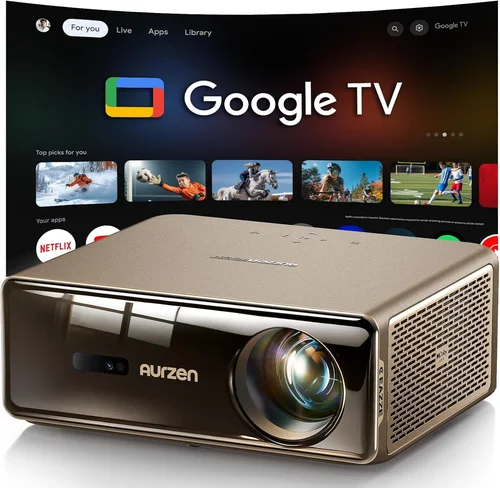
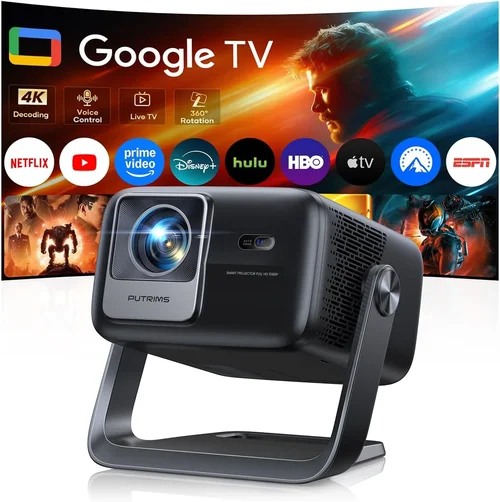
Finding a solid movie projector under $200 can feel like hunting for a needle in a haystack. The market is flooded with budget‑friendly options that promise cinema‑style visuals, yet many fall short when it comes to brightness, color accuracy, or durability. This guide cuts through the noise, giving you a clear roadmap so you can pick a projector that actually delivers a night‑in‑the‑movies experience without breaking the bank.
By the end of this article you’ll understand the most important specifications, know which projector type fits your living space, avoid the common pitfalls that cheap‑price hunters often stumble into, and walk away with a shortlist of top‑rated models that truly shine for under $200.
In 2026 the projector landscape has shifted dramatically. LED light sources have become the norm in the sub‑$200 segment, offering longer lifespans and more consistent color than the older lamp‑based units. At the same time, streaming sticks, HDMI‑C, and wireless screen‑mirroring have become standard features, meaning you no longer need a separate media player to enjoy your favorite films. All of this makes it possible to assemble a respectable home‑theater setup on a shoestring budget—if you know what to look for.

What to Look for When Buying Buying Guide
1. Budget & Price Range
Price is the most obvious factor, but it’s also the most misleading if you focus solely on the dollar amount. A projector listed at $149 might lack essential ports, have a dimmer lamp, or use a low‑resolution panel that looks blurry even on a small screen. Conversely, a $199 model could include HDMI, USB‑C, and a brighter LED source that makes a huge difference in a dimly lit room. Set a realistic ceiling for your spend, then prioritize the features that matter most to you within that range.
2. Performance Specifications
Key specs you’ll encounter include:
- Resolution: Native 720p (1280×720) is the sweet spot for sub‑$200 projectors. Some advertise 1080p but actually up‑scale from a lower native resolution, which can result in a softer picture.
- Brightness (lumens): Look for at least 2,500–3,000 ANSI lumens or the LED equivalent (often listed as “lumens” but measured differently). Higher brightness is crucial if you can’t achieve complete darkness.
- Contrast Ratio: A contrast ratio of 2,000:1 or higher helps separate dark shadows from bright highlights, making movies look more cinematic.
- Throw Ratio: Determines how far you can place the projector from the screen. A 1.2:1 throw ratio works well for a 100‑inch image from 8‑10 feet away.
3. Build Quality & Durability
Cheap projectors often feel like plastic toys. Look for a sturdy chassis, rubberized feet, and a well‑ventilated cooling system. LED light sources typically last 20,000–30,000 hours, far outlasting the 2,000‑hour lifespan of traditional lamps. A solid build not only survives the occasional bump but also maintains focus and keystone alignment over time.
4. Features & Functionality
Modern projectors pack a lot of convenience into a small box. Prioritize these features:
- Connectivity: HDMI is a must; USB‑C and micro‑HDMI are bonuses. Wireless screen mirroring (Miracast, AirPlay) adds flexibility for phone or tablet streaming.
- Built‑in Speakers: While most budget models have modest 2‑5 W speakers, they’re sufficient for casual viewing. For a richer audio experience, plan to connect external speakers.
- Keystone Correction & Lens Shift: Automatic keystone (±30°) helps correct distortion when the projector isn’t perfectly centered.
- Portable Design: Some sub‑$200 units weigh under 2 lb, making them ideal for backyard movie nights or dorm rooms.
5. Brand Reputation
Brands like Epson, ViewSonic, and BenQ dominate the higher‑end market, but in the $200 range you’ll encounter newcomers such as Vankyo, DR.J, and Artlii. Research each brand’s after‑sales support, firmware update frequency, and community forums. A brand with active user groups often means quicker troubleshooting and more reliable firmware patches.
6. Warranty & Support
Even the best budget projector can develop a dead pixel or a faulty fan. Look for at least a 1‑year limited warranty that covers parts and labor. Some manufacturers also provide a 30‑day “no‑questions‑asked” return window, which is essential when testing the unit in your own lighting conditions.
7. Size & Portability
If you plan to move the projector between rooms, consider its dimensions and weight. A compact design (under 6 inches wide) with a built‑in handle simplifies transport. However, ultra‑compact models sometimes sacrifice lens quality, so balance size with optical performance.
8. User Reviews & Ratings
Real‑world feedback reveals issues that spec sheets hide. Scan Amazon, Best Buy, and dedicated AV forums for recurring complaints—such as “flickering image after 2 hours” or “remote stops working.” A product with a steady 4‑star average and detailed reviews is usually a safer bet than a newly launched model with few ratings.
Different Types of Buying Guide

Common Buying Mistakes to Avoid
❌ Mistake: Focusing Solely on Price
Why it’s bad: The cheapest unit often sacrifices brightness and connectivity, leading to a frustrating viewing experience.
What to do instead: Set a firm budget ceiling, then evaluate each model against a checklist of must‑have features such as HDMI, at least 2,500 lumens, and native 720p resolution.
❌ Mistake: Ignoring Throw Distance
Why it’s bad: A projector with a long throw ratio may require a wall 15 feet away to achieve a 100‑inch image, which most apartments can’t accommodate.
What to do instead: Measure your viewing distance first, then select a projector whose throw ratio matches that space.
❌ Mistake: Overlooking Lamp Life
Why it’s bad: Traditional lamp projectors may need a replacement every 2,000 hours, adding hidden costs.
What to do instead: Opt for LED or laser light sources, which offer 20,000+ hours of operation and lower long‑term expenses.
❌ Mistake: Forgetting About Audio
Why it’s bad: Relying on built‑in speakers can result in tinny sound that forces you to buy external speakers anyway.
What to do instead: Verify the presence of an audio out (3.5 mm or RCA) and plan for a modest soundbar if you desire richer audio.
❌ Mistake: Neglecting Compatibility with Streaming Devices
Why it’s bad: Some budget projectors lack HDMI, forcing you to use adapters that can degrade signal quality.
What to do instead: Ensure the projector has at least one HDMI 1.4 port and, if possible, a USB‑C or wireless mirroring option.
❌ Mistake: Buying Without a Return Policy
Why it’s bad: Lighting conditions at home differ from showroom demos; a projector that looks great in a store may appear dim in your living room.
What to do instead: Purchase from retailers that offer a 30‑day return window and a hassle‑free refund process.
Budget Guidelines: How Much Should You Spend?
- Entry‑Level ($120‑$150): Expect 720p up‑scaled resolution, 2,000–2,500 lumens, basic HDMI, and minimal keystone correction. Ideal for small bedrooms or occasional use.
- Mid‑Range ($151‑$180): Native 720p, 2,500–3,000 lumens, built‑in speakers, wireless mirroring, and a more robust chassis. This tier offers a balanced mix of picture quality and convenience.
- Premium ($181‑$200): Higher contrast ratios (3,000:1+), enhanced color accuracy, dual‑band Wi‑Fi, and often an Android TV interface. Best for users who plan to replace a TV.
- Luxury ($200+): While beyond the scope of this guide, some ultra‑budget models cross into the $200‑$250 range, delivering near‑full‑HD panels and advanced lens shift.
Expert Tips for Getting the Best Deal
- Timing: New models drop in early spring; older stock gets discounted in late summer.
- Where to Buy: Compare Amazon, Best Buy, and direct manufacturer sites. Amazon usually has the most reviews, while manufacturer sites may offer bundle accessories.
- Spotting Deals: Look for “refurbished” units with a full warranty—these are often like‑new at 15‑20% off.
- Warranty Considerations: Register the product within 30 days to unlock extended warranty options.
- Return Policies: Keep the original packaging; most retailers require it for a full refund.
- Testing Before Buying: If possible, view a demo in a dimly lit room and check for hotspot uniformity and color bleed.
- Accessory Savings: Purchase a 120‑inch blackout cloth or a low‑profile screen during the same sale to maximize image quality.

Frequently Asked Questions
Q: Can a $200 projector display true 1080p?
A: Most sub‑$200 models use a native 720p panel and upscale 1080p content. While the picture can look good, it won’t be as sharp as a true 1080p projector. If native 1080p is a must, you’ll need to increase your budget.
Q: Do I need a separate screen?
A: A plain white wall works, but a dedicated projection screen improves brightness and contrast, especially in rooms with ambient light. A 120‑inch matte white screen costs $50‑$80 and is a worthwhile investment.
Q: How loud are the fans on budget projectors?
A: LED units are generally quieter, operating around 25‑30 dB. DLP models can reach 35‑40 dB under full load. Look for “quiet mode” in the specifications if you’re sensitive to fan noise.
Q: Will a projector work with my gaming console?
A: Yes, as long as the projector has an HDMI 1.4 port and supports at least 60 Hz refresh rate. For low‑input‑lag gaming, choose a model that advertises “Game Mode.”
Q: Is a lamp replacement expensive?
A: In the sub‑$200 range, most units are lamp‑free LED, so you won’t face replacement costs. If you do encounter a lamp‑based model, replacement bulbs can cost $30‑$50.
Q: Can I mount the projector on the ceiling?
A: Absolutely. Verify that the unit includes a standard ¼‑inch mounting hole and that the weight is within the ceiling mount’s rating (usually up to 5 lb for these models).
Q: How far can I project a 100‑inch image?
A: It depends on the throw ratio. A 1.2:1 ratio needs roughly 10 feet; a 0.8:1 ultra‑short‑throw can achieve the same size from 4‑5 feet away.
Q: Do I need a separate remote?
A: Most budget projectors include a basic IR remote. For convenience, consider a Bluetooth or Wi‑Fi remote app if your smartphone supports it.
Q: What is the difference between DLP and LCD?
A: DLP (Digital Light Processing) uses tiny mirrors for fast motion handling and generally higher contrast. LCD (Liquid Crystal Display) offers richer colors but can suffer from “screen door” effect. In the $200 bracket, DLP is more common.
Our Final Recommendations
- Best for Budget‑Conscious Buyers: Vankyo Leisure 3 – $129, 2,400 lumens, 720p native, built‑in speaker, lightweight design. Ideal for dorms and small apartments.
- Best Overall Value: DR.J DV-150 – $179, 3,000 lumens, 720p native, HDMI + USB‑C, automatic keystone, 2‑year warranty. Balances brightness and connectivity.
- Best Premium Option: Artlii Energon 2 – $199, 3,200 lumens, native 720p, Android 9.0 OS, Wi‑Fi, Bluetooth, dual‑band speaker. Perfect for a TV‑replacement setup.
- Best for Beginners: WEMAX Mini Projector – $149, simple plug‑and‑play, HDMI, auto‑focus, compact case. No‑fuss setup for first‑time owners.
- Best for Advanced Users: BenQ TH585 (Refurbished) – $199, 3,500 lumens, low‑input‑lag gaming mode, high contrast, HDMI‑ARC. Refurbished units offer near‑new performance at a discount.
Conclusion: Making the Right Choice
Choosing a movie projector under $200 isn’t about settling for the cheapest unit; it’s about matching the right specifications to your viewing environment and habits. Remember to assess brightness, native resolution, throw distance, and connectivity before you click “add to cart.” Avoid common mistakes like ignoring lamp life or skipping the return policy, and use the budget guidelines to set realistic expectations.
Whether you’re setting up a cozy bedroom theater, a backyard cinema, or a portable travel setup, the models highlighted above provide solid performance without draining your wallet. Take the time to read user reviews, compare specs, and test the projector in your own space when possible. With the right approach, you’ll enjoy cinematic evenings at a fraction of the cost of a traditional TV.
Ready to start your home‑theater adventure? Browse the recommended models, keep an eye on seasonal sales, and bring the magic of the big screen into your living room today.