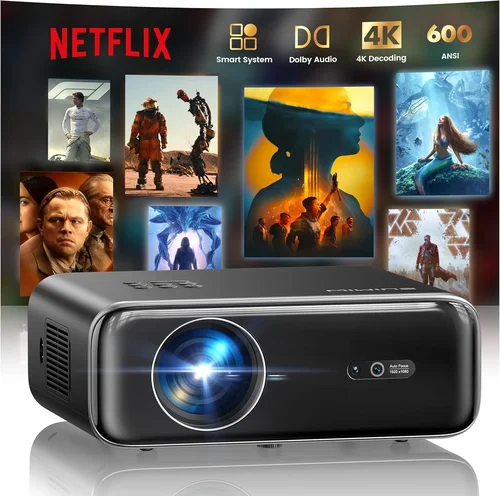
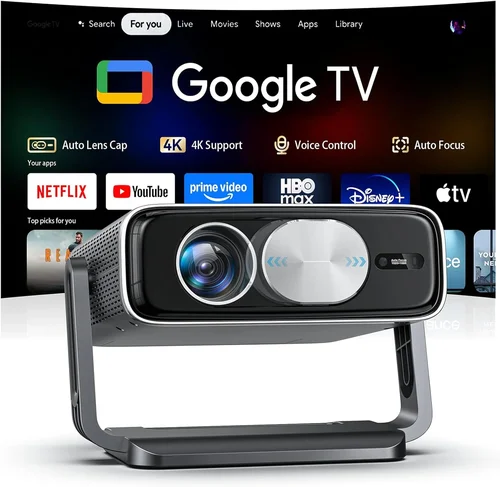
Choosing the right projector for a home‑theater setup can feel like navigating a maze of specifications, brand names, and price points. The market in 2026 is flooded with options that promise cinema‑grade experiences, yet not every model lives up to the hype—especially when you’re trying to stay under the $1,000 ceiling. This guide cuts through the noise. We’ll explain why each spec matters, compare the main types of projectors, point out common pitfalls, and give you a clear road map to the best projector for your budget, room, and viewing habits.
By the end of this article you’ll know exactly what to look for, how to match a projector to your space, and which three to five models consistently outperform the competition without breaking the bank. Whether you’re a movie‑buff who wants a dark‑room experience, a gamer after low‑input‑lag, or a family that needs a versatile, easy‑to‑use device, the information here will help you make a confident, data‑driven decision.

What to Look for When Buying Buying Guide
1. Budget & Price Range
Sticking to a sub‑$1,000 budget forces you to prioritize certain features over others. In this segment you’ll find solid‑state (LED) and laser‑based projectors that deliver bright, color‑accurate images, but you’ll rarely see true 4K resolution. Understanding the trade‑offs—such as opting for 1080p with higher brightness versus 4K with lower lumens—helps you allocate your dollars where they matter most for your viewing environment.
2. Performance Specifications
Three specs dominate the conversation: brightness (measured in lumens), contrast ratio, and native resolution. For a dedicated home theater with controlled lighting, 1,800–2,500 lumens is sufficient; brighter rooms may need 2,500+ lumens. Contrast ratio determines how deep the blacks appear—a ratio of 20,000:1 or higher is ideal for cinematic depth. Finally, native resolution should be at least 1080p (Full HD); many models now offer “4K‑enhanced” processing that upsamples a 1080p chip, delivering sharper images without the cost of true 4K panels.
3. Build Quality & Durability
Projectors are mechanical devices with moving parts (lamp housings, cooling fans) that can wear over time. Look for metal chassis, sealed optics, and a reputable cooling system. A good indicator of durability is the lamp or light‑source lifespan—LED and laser units often promise 20,000–30,000 hours, far outlasting traditional UHP lamps that need replacement every 2,000–3,000 hours.
4. Features & Functionality
Modern projectors bundle a suite of conveniences: built‑in speakers, wireless screen mirroring (AirPlay, Miracast, Chromecast), keystone correction, and lens shift. While built‑in audio rarely replaces a dedicated sound system, having Bluetooth or HDMI‑ARC can simplify cabling. Lens shift is a game‑changer for flexible placement, allowing you to move the projector without distorting the image.
5. Brand Reputation
Brands that have been in the AV market for decades—Epson, BenQ, Optoma, ViewSonic—tend to offer more reliable firmware updates and better customer support. Newer entrants may bring innovative tech but can suffer from limited service networks. Checking long‑term user forums and professional reviews gives insight into how a brand handles firmware bugs and parts availability.
6. Warranty & Support
A solid warranty can save you thousands. Look for at least a 2‑year coverage on the projector itself, with an extended warranty option for the light source. Some manufacturers also provide on‑site service for business‑class models, which can be a bonus if you plan to use the projector frequently.
7. Size & Portability (if applicable)
If you intend to move the projector between rooms or take it to a friend’s house, size and weight matter. Most home‑theater units sit on a shelf or ceiling mount and weigh between 5–10 lb. Portable pico‑projectors are lighter but usually sacrifice brightness and contrast, making them less suitable for a dedicated cinema room.
8. User Reviews & Ratings
Beyond professional lab tests, real‑world user feedback reveals long‑term reliability and ease of use. Look for patterns in reviews—consistent complaints about heat, fan noise, or firmware glitches are red flags. High‑rating models with thousands of verified purchases often indicate a well‑rounded product.
Different Types of Buying Guide

Common Buying Mistakes to Avoid
❌ Mistake: Ignoring Room Lighting Conditions
Why it’s bad: Buying a dim 1,200‑lumens projector for a bright living room will result in washed‑out images.
What to do instead: Measure the ambient light level. If you cannot achieve near‑darkness, aim for 2,500+ lumens. Use blackout curtains or consider a higher‑lumens model.
❌ Mistake: Over‑focusing on Resolution Alone
Why it’s bad: A true 4K projector under $1,000 often sacrifices brightness and contrast, delivering a dull picture.
What to do instead: Prioritize brightness and contrast first; then look for good upscaling (4K‑enhanced) if you need sharper detail.
❌ Mistake: Forgetting About Throw Distance
Why it’s bad: Placing a projector too far or too close can force you into awkward zoom settings, reducing image quality.
What to do instead: Use the manufacturer’s throw‑ratio chart. Measure your room’s width and calculate the ideal placement distance before purchasing.
❌ Mistake: Neglecting Lens Shift and Keystone
Why it’s bad: Relying solely on digital keystone correction can degrade sharpness and introduce distortion.
What to do instead: Choose a model with optical lens shift for flexible mounting, and use only minimal digital keystone if needed.
❌ Mistake: Assuming All Built‑in Speakers Are Sufficient
Why it’s bad: Built‑in speaker packages rarely exceed 15 W total and lack true surround sound.
What to do instead: Plan for an external sound system—soundbar or AV receiver—and verify the projector has HDMI‑ARC or optical audio out.
❌ Mistake: Overlooking Warranty Terms
Why it’s bad: A cheap projector may have a 1‑year “parts only” warranty, leaving you to foot the bill for lamp replacement.
What to do instead: Choose a model with at least a 2‑year full warranty and a clear lamp‑life guarantee. Consider extended coverage if you plan heavy use.
❌ Mistake: Buying Without Testing
Why it’s bad: Online specs can be misleading; you might end up with excessive fan noise or poor color rendering.
What to do instead: Visit a local electronics store, view a demo, or buy from a retailer with a generous return window (30 days or more).
Budget Guidelines: How Much Should You Spend?
- Entry‑Level ($550‑$700): Expect 1080p resolution, 1,800–2,200 lumens, basic HDMI ports, and limited lens shift. Good for small bedrooms or occasional movie nights.
- Mid‑Range ($701‑$900): Offers 1080p or true 4K‑enhanced, 2,200–2,800 lumens, higher contrast ratios (20,000:1+), and more connectivity (USB‑C, wireless screen mirroring). This tier balances performance and price for most home‑theater enthusiasts.
- Premium ($901‑$1,000): Usually LED or laser light sources, 2,800+ lumens, advanced color management (HDR10, HLG), lens shift, and robust build quality. Ideal for dedicated rooms with controlled lighting.
- Luxury ($1,001+): True 4K native panels, laser light engines with 4,000+ lumens, ultra‑short‑throw designs, and integrated smart platforms. Though beyond the $1,000 cap, these models illustrate the performance ceiling you’re approaching.
Expert Tips for Getting the Best Deal
- Timing: New product cycles typically launch in Q2. Buying a month after launch can net you a “last‑gen” discount while still retaining modern features.
- Retailers: Compare prices on Amazon, Best Buy, and manufacturer sites. Some brands offer exclusive bundles (extra lamp, wall mount) that add value.
- Deal Spotting: Look for coupon codes on sites like RetailMeNot, and check refurbished sections—certified refurbished units often come with full warranties at 15‑25% off.
- Warranty Extensions: If you plan to use the projector more than 150 hours per week, an extended warranty covering the light source is a smart investment.
- Return Policies: Choose sellers with at least a 30‑day return window and free return shipping. This safety net lets you test the projector in your own lighting conditions.
- Testing Before Buying: Bring a portable HDMI source (laptop or streaming stick) to a store demo and evaluate brightness, color accuracy, and fan noise at your typical viewing distance.
- Bundle Savings: Purchasing a wall‑mount, HDMI cable, and screen together can save 10‑15% compared to buying separately.

Frequently Asked Questions
Q: Do I need a separate screen, or can I project onto a wall?
A: You can project onto a smooth white wall, but a dedicated projector screen improves gain (brightness) and color accuracy, especially in rooms with some ambient light. A 120‑inch 16:9 screen is a common sweet spot for most living rooms.
Q: How far should the projector be from the screen?
A: It depends on the throw ratio. For a 1.5:1 ratio, a 120‑inch image requires roughly 12‑15 ft of distance. Use the manufacturer’s throw‑ratio calculator to determine exact placement.
Q: Is a 4K‑enhanced projector worth it?
A: 4K‑enhanced models upscale a 1080p chip to near‑4K clarity. They provide sharper detail than standard 1080p without the cost of true 4K. For most viewers under $1,000, a good 4K‑enhanced projector offers the best visual return.
Q: Can I use a projector for gaming?
A: Yes, but prioritize low input lag (under 30 ms) and a high refresh rate (60 Hz or higher). DLP models often have the best gaming performance in this price range.
Q: How often do I need to replace the lamp?
A: LED and laser light sources last 20,000‑30,000 hours, effectively the life of the projector. Traditional UHP lamps need replacement every 2,000‑3,000 hours, which can cost $150‑$250.
Q: Will a portable pico‑projector work for home theater?
A: Pico‑projectors are great for casual viewing but usually lack the brightness (under 1,000 lumens) and contrast needed for a true home‑theater experience.
Q: What connectivity options should I look for?
A: At minimum, HDMI 2.0 (supports 4K/60 Hz), HDMI ARC for audio, USB‑C for future‑proofing, and wireless casting (AirPlay 2, Chromecast Built‑in). Some models also include Ethernet for stable streaming.
Our Final Recommendations
Best for Budget‑Conscious Buyers
Model: BenQ TH585
Why: 3,500 lumens, 1080p, 16 ms input lag, and a solid 10,000:1 contrast ratio—all for around $650. It delivers bright, sharp images in moderately lit rooms and includes a handy sport mode for fast‑action content.
Best Overall Value
Model: Epson Home Cinema 2150
Why: 2,500 lumens, 1080p, 3,000:1 contrast, lens shift, and wireless screen mirroring. Priced at $850, it balances brightness, color accuracy, and flexibility, making it a versatile choice for movies and gaming alike.
Best Premium Option
Model: Optoma UHD38
Why: 4,000 lumens, true 4K resolution, 2,400:1 contrast, 4 ms input lag, and HDR10 support. At just under $1,000, it pushes the envelope of what a sub‑$1,000 projector can achieve, especially for dark‑room setups.
Best for Beginners
Model: ViewSonic PX706HD
Why: Short‑throw design (requires only 4‑5 ft for a 100‑inch image), 3,200 lumens, and easy‑setup wizard. Ideal for small apartments where space is limited, and priced around $580.
Best for Advanced Users
Model: LG HU80KA (on sale for $999)
Why: Laser light source with 2,500 lumens, 4K resolution, HDR10, built‑in smart TV platform, and a unique vertical‑lens design for flexible placement. While it stretches the budget, its feature set rivals higher‑priced models.
Conclusion: Making the Right Choice
Finding the best projector for a home theater under $1,000 boils down to matching the projector’s strengths to your viewing environment and priorities. Assess room lighting, decide whether you need true 4K or can settle for 4K‑enhanced, and factor in connectivity and long‑term costs like lamp replacement. By avoiding common mistakes—ignoring throw distance, over‑relying on built‑in speakers, or skipping warranty checks—you’ll protect your investment and enjoy a cinema‑like experience for years.
Take the recommendations above as a starting point, test the models if possible, and keep an eye on seasonal sales. With the right research and a clear understanding of your needs, you’ll be able to create a stunning home‑theater setup without exceeding your $1,000 budget.