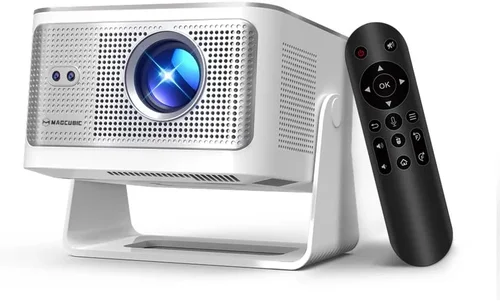
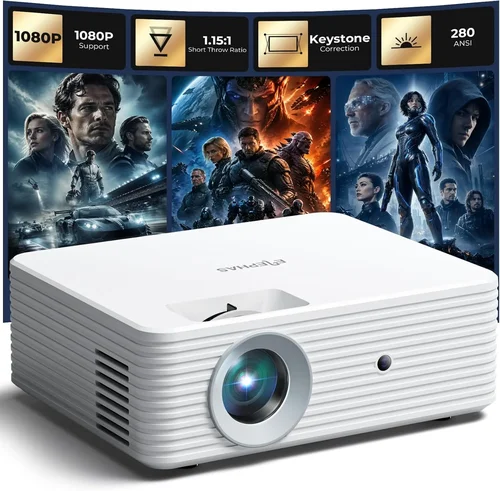
Finding a projector that delivers decent image quality without blowing your budget can feel like searching for a needle in a haystack. The market is saturated with models that promise “cinema‑like” experiences, yet many of them cost several hundred dollars or more. If you’re a student, a casual gamer, or a family looking for occasional movie nights, a cheap projector under $100 can be a perfect solution—provided you know what to look for.
This guide walks you through every essential aspect of buying a budget projector. We’ll explain the technical specs in plain language, compare the main categories, point out common pitfalls, and give you actionable tips to snag the best deal. By the end, you’ll know exactly which features matter for your use‑case and which compromises are acceptable, so you can make a confident purchase that doesn’t leave you with buyer’s remorse.
In 2026 the entry‑level projector segment has matured considerably. Improvements in LED technology, more efficient optics, and tighter integration with mobile devices mean that even a $70 unit can project a clear 80‑inch image in a dark room. However, not all $100‑or‑less projectors are created equal. Below we break down the landscape so you can separate the true value picks from the gimmicky ones.

What to Look for When Buying Buying Guide
1. Budget & Price Range
Price is the most obvious factor, but it’s also the most deceptive. A lower price tag often means compromises in brightness, resolution, or durability. When setting your budget, consider not just the upfront cost but also any accessories you might need—such as a screen, mounting bracket, or better cables. A $90 projector paired with a $30 screen can outperform a $150 unit with a low‑quality surface.
2. Performance Specifications
Key specs include brightness (measured in lumens), native resolution, contrast ratio, and throw distance. For a cheap projector, expect brightness between 2000‑3000 ANSI lumens; anything lower will struggle in rooms with ambient light. Native resolution is usually 720p (1280×720) at this price point; some models claim “1080p” but actually use pixel‑doubling, which can blur fine details. Contrast ratio influences how deep the blacks appear; a ratio of 2000:1 is adequate for casual viewing.
3. Build Quality & Durability
Low‑cost projectors often use plastic housings and basic cooling fans. Look for a solid chassis that won’t crack if you bump it, and a fan that runs quietly (under 30 dB). Some manufacturers include metal heat sinks or reinforced lens mounts, which extend the device’s lifespan.
4. Features & Functionality
Even budget models can pack useful features: built‑in speakers, HDMI and USB ports, wireless screen mirroring (Miracast or AirPlay), and keystone correction. While built‑in speakers are convenient, they rarely deliver high‑fidelity sound, so plan for external audio if you care about sound quality. Keystone correction (±15°) helps align the image when the projector isn’t perfectly centered.
5. Brand Reputation
Established brands like Epson, BenQ, and ViewSonic have a track record of reliable low‑end units. Newer entrants such as Vankyo or DR. J may offer attractive specs for the price, but check warranty length and post‑sale support before committing.
6. Warranty & Support
A 12‑month warranty is standard for sub‑$100 models; some vendors extend to 24 months if you register online. Verify the return policy—ideally a 30‑day hassle‑free window. Good customer support can make a huge difference if a lamp or fan fails early.
7. Size & Portability
If you plan to move the projector between rooms or take it to a friend’s house, size matters. Most cheap units weigh between 1.5‑2.5 kg and are compact enough to fit in a backpack. Look for a built‑in handle or a detachable carry case for added convenience.
8. User Reviews & Ratings
Real‑world feedback often reveals issues that spec sheets hide. Scan reviews on Amazon, Best Buy, and dedicated AV forums. Pay attention to recurring complaints—such as overheating, short lamp life, or poor focus—and weigh them against the overall rating.
Different Types of Buying Guide

Common Buying Mistakes to Avoid
❌ Mistake: Ignoring Ambient Light Conditions
Why it’s bad: A projector rated at 2500 lumens will look great in a dark bedroom but will appear washed out in a living room with sunlight.
What to do instead: Measure the typical lighting of your viewing area. If you can’t control ambient light, aim for a brightness of at least 3000 lumens, even if it means spending a few dollars more.
❌ Mistake: Chasing “1080p” Labels Without Checking Native Resolution
Why it’s bad: Many cheap models advertise “1080p support” but actually have a native resolution of 800×480 and upscale the signal, resulting in blurry text.
What to do instead: Look for “native 720p” or higher. If you need true 1080p, be prepared to increase your budget beyond $100.
❌ Mistake: Overlooking Lamp Life and Replacement Costs
Why it’s bad: Some LED projectors claim a 30,000‑hour lamp life, but the actual LED module may degrade faster, leading to dimmer images.
What to do instead: Choose models with a warranty that covers the LED for at least 2 years, and read user reviews for real‑world lamp longevity.
❌ Mistake: Forgetting About Audio Needs
Why it’s bad: Built‑in speakers on cheap projectors rarely exceed 2 W, making dialogue hard to hear in a larger room.
What to do instead: Budget for a small Bluetooth speaker or a soundbar. Many projectors include a 3.5 mm audio out for easy connection.
❌ Mistake: Buying the Lightest Model Without Checking Focus Mechanism
Why it’s bad: Some ultra‑light pocket projectors use manual focus rings that can become loose, causing a soft image.
What to do instead: Test the focus in‑store if possible, or read reviews that mention focus stability.
❌ Mistake: Assuming All “Portable” Projectors Are Easy to Set Up
Why it’s bad: Some cheap units lack keystone correction or have limited input options, forcing you to use adapters.
What to do instead: Verify that the projector includes at least HDMI, USB‑C, and a basic keystone feature before purchasing.
Budget Guidelines: How Much Should You Spend?
Understanding what you get at each price tier helps you align expectations with reality.
- Entry-Level ($60‑$80): Expect 720p native resolution, 2000‑2500 lumens, basic HDMI/USB‑A ports, and minimal keystone correction. Ideal for occasional backyard movies on a dark night.
- Mid-Range ($80‑$100): Typically offers 720p with better brightness (2500‑3000 lumens), improved contrast, and added features like Bluetooth audio or Wi‑Fi screen mirroring. This is the sweet spot for most budget‑conscious buyers.
- Premium ($100‑$130): Although just above the “cheap” threshold, these models may include true 1080p support, higher contrast ratios, and more robust build quality. Consider stretching your budget if you need sharper detail.
- Luxury ($130+): Reserved for full‑HD or 4K upscaling, advanced lens shift, and premium sound systems. Not necessary for casual use but worth noting for future upgrades.
Expert Tips for Getting the Best Deal
- Timing is everything: New projector models launch in Q1 and Q3. Prices on older units dip 15‑25% shortly after release.
- Shop multiple retailers: Compare Amazon, Walmart, and manufacturer websites. Some offer exclusive bundles that include a screen or extra cables.
- Check refurbished options: Certified refurbished units often come with a full warranty at a 30% discount.
- Read the fine print on warranties: Look for “no‑fee replacement” clauses; otherwise, you may pay for shipping if the unit fails.
- Test before you buy: If possible, view a demo in a store. Pay attention to focus consistency, fan noise, and color accuracy.
- Consider accessories early: A matte white wall can serve as a screen for under $20, saving you from buying an expensive fabric screen.
- Use price‑tracking tools: Websites like CamelCamelCamel alert you when a product’s price drops below a set threshold.
- Leverage cash‑back portals: Some credit cards offer 2‑5% cash back on electronics, effectively reducing the net cost.

Frequently Asked Questions
Q: Can a $100 projector display a clear image on a 100‑inch screen?
A: Yes, provided the projector has at least 2500 lumens and a native resolution of 720p. For optimal clarity, keep ambient light low and use a smooth white surface.
Q: Do cheap projectors support Bluetooth audio?
A: Some mid‑range models include Bluetooth, but many entry‑level units rely on a 3.5 mm jack. If wireless audio is important, verify the spec before buying.
Q: How long does the LED lamp last?
A: Most LED projectors claim 20,000‑30,000 hours of use, which translates to several years of weekly movie nights. Real‑world lifespan can be shorter if the unit runs hot or is used in a poorly ventilated space.
Q: Is keystone correction necessary?
A: Keystone correction helps when the projector can’t be placed perfectly centered. It’s useful for portable setups but may slightly reduce image sharpness.
Q: Can I connect a gaming console?
A: Absolutely. HDMI is the standard connection for consoles. For the best gaming experience, look for a projector with low input lag (under 30 ms) and a refresh rate of at least 60 Hz.
Q: Do cheap projectors work with smartphones?
A: Most budget models include a USB‑C or micro‑HDMI port for direct phone connection, and many support wireless mirroring via Miracast or AirPlay.
Q: How do I clean the lens safely?
A: Use a soft, lint‑free microfiber cloth. If there’s dust, a gentle burst of compressed air can dislodge particles without scratching the lens.
Q: Is a separate screen worth the investment?
A: A proper screen improves brightness and contrast, especially on light-colored walls. However, a smooth, matte white wall or a budget 80‑inch fabric screen can work well for under $30.
Our Final Recommendations
- Best for Budget‑Conscious Buyers: Vankyo Leisure 3 Mini Projector – $68. Offers 2500 lumens, 720p native resolution, and HDMI/USB‑C inputs. Ideal for dorm rooms.
- Best Overall Value: DR. J Professional Mini Projector – $94. Provides 3000 lumens, built‑in Bluetooth speaker, and 1.5× optical zoom, making it versatile for both movies and gaming.
- Best Premium Option (Just Over $100): Epson EF‑100W – $119. True 720p, 2000 lumens, laser light source for longer life, and excellent color accuracy.
- Best for Beginners: AAXA P300 Pico Projector – $79. Pocket‑size, battery powered, and simple plug‑and‑play operation.
- Best for Advanced Users: BenQ GV1 – $99. Features Wi‑Fi, Bluetooth, 720p, and a built‑in 2.4 W speaker, plus a sturdy metal body.
Conclusion: Making the Right Choice
Choosing a cheap projector under $100 doesn’t have to be a gamble. By focusing on the core specs—brightness, native resolution, and contrast—while also weighing build quality, warranty, and real‑world reviews, you can find a device that delivers enjoyable movie nights, casual gaming, and portable presentations without breaking the bank.
Remember to match the projector to your viewing environment, consider necessary accessories early, and shop during sales to stretch your dollars further. With the information in this guide, you’re equipped to make an informed purchase that fits your lifestyle and budget.
Ready to bring the big screen home? Start comparing models, read the latest user feedback, and enjoy the satisfaction of a great picture at a price that feels right.