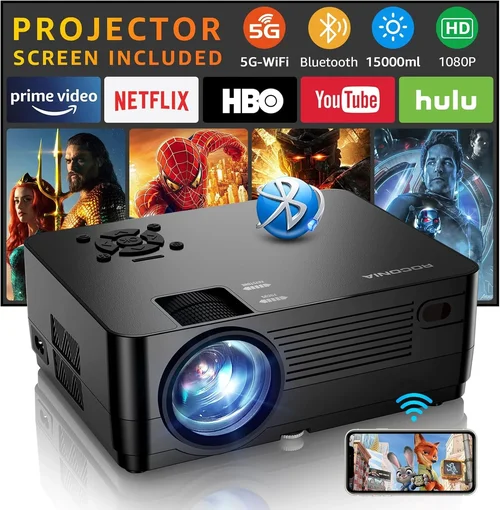
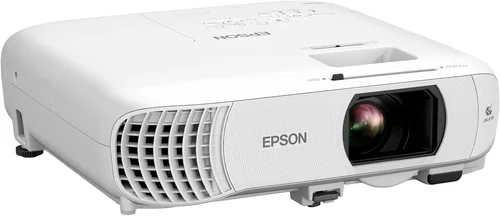
Welcome to the most thorough guide you’ll find for choosing a cinema‑style projector under $500. Whether you’re setting up a home theater in a spare bedroom, a backyard movie night, or a portable setup for travel, the right projector can transform ordinary evenings into blockbuster experiences. The market is flooded with options, and price tags can be misleading—some cheap units sacrifice image quality, while others cut corners on durability. This guide cuts through the noise, giving you the knowledge to make a confident purchase without overspending.
In the next several sections you’ll learn how to evaluate key specifications, compare the main projector families, avoid common pitfalls, and allocate your budget wisely. By the end, you’ll be equipped to pick a model that delivers crisp, bright images, reliable performance, and the features you actually need—all for less than $500.

What to Look for When Buying Buying Guide
1. Budget & Price Range
Price is the most obvious filter, but it’s more than a number. Within the sub‑$500 bracket you’ll find three distinct tiers: entry‑level ($150‑$250), mid‑range ($250‑$400), and high‑end budget ($400‑$500). Entry‑level units often use lower‑resolution panels and modest brightness, making them suitable for dark rooms only. Mid‑range models typically upgrade to Full HD (1080p) or enhanced 720p chips, and they deliver higher lumens, which means you can tolerate some ambient light. The high‑end budget tier pushes brightness above 3,000 lumens and may include features like lens shift or higher contrast ratios, approaching the performance of $1,000‑plus home‑theater projectors.
Set a clear ceiling for your spend, then decide which compromises you’re willing to accept. If you plan to watch movies in a completely dark room, you might stay at the entry level. If you need flexibility for daytime viewing, aim for the mid‑range or higher.
2. Performance Specifications
Three specs dominate projector performance: resolution, brightness (measured in ANSI lumens), and contrast ratio.
- Resolution: 720p (1280×720) is the minimum for a decent movie experience; 1080p (1920×1080) is ideal and increasingly common under $500. Some models use native 1080p panels, while others upscale 720p content.
- Brightness: For dark‑room use, 1,500–2,000 lumens is sufficient. If you expect ambient light, target 2,500–3,500 lumens.
- Contrast Ratio: Higher contrast means deeper blacks and more detail in dark scenes. Look for ratios of at least 10,000:1; anything above 20,000:1 is excellent for the price range.
Balancing these three will determine how cinematic your picture looks.
3. Build Quality & Durability
Projectors are often moved, set up, and taken down repeatedly. A solid metal chassis, reinforced hinges, and a reliable cooling system are essential. Cheaper plastic housings can warp over time, leading to misaligned lenses or overheating. Check for user reviews that mention long‑term reliability, and consider models with a sealed lamp compartment to protect against dust.
4. Features & Functionality
Beyond the basics, modern projectors pack useful extras:
- Lamp Life: LED or laser light sources can last 20,000–30,000 hours, far exceeding traditional lamps (2,000–5,000 hours).
- Connectivity: HDMI is a must; USB‑C, Wi‑Fi, Bluetooth, and built‑in streaming apps (Netflix, YouTube) add convenience.
- Lens Shift & Keystone Correction: Lens shift moves the image without distortion, while keystone corrects trapezoidal distortion when the projector isn’t perfectly centered.
- Throw Ratio: Determines how far the projector must be from the screen for a given image size. Short‑throw (< 0.4) is great for small rooms; standard throw (1.2‑2.0) works in larger spaces.
5. Brand Reputation
Established brands like Epson, BenQ, ViewSonic, and Optoma have proven track records for support and firmware updates. Newer entrants may offer lower prices but could lack long‑term service or spare parts. Research each brand’s warranty terms and read community forums to gauge real‑world satisfaction.
6. Warranty & Support
A solid warranty protects your investment. Look for at least a 2‑year warranty that covers the lamp or laser module. Some manufacturers offer extended coverage for an additional fee. Also, verify the availability of local service centers or easy mail‑in repair options.
7. Size & Portability
If you plan to move the projector between rooms or take it on the road, weight and dimensions matter. Compact models under 2 kg are easy to carry, while larger units may need a dedicated shelf or cart. Consider whether you need a built‑in speaker—most budget projectors have modest audio, so external speakers are often a better choice.
8. User Reviews & Ratings
Numbers on a spec sheet tell only part of the story. Dive into user reviews on Amazon, B&H, and specialized forums. Look for recurring themes: consistent overheating, remote control latency, or excellent color accuracy. A product with a high average rating but many low‑star complaints may indicate quality control issues.
Different Types of Buying Guide

Common Buying Mistakes to Avoid
❌ Mistake: Ignoring Ambient Light Conditions
Why it’s bad: Purchasing a low‑lumens projector for a room with windows will result in washed‑out images and a disappointing viewing experience.
What to do instead: Measure the typical light level, then choose a projector with at least 2,500 lumens for semi‑bright rooms, or add blackout curtains to control lighting.
❌ Mistake: Over‑Focusing on Resolution Alone
Why it’s bad: A 1080p panel with poor contrast and low brightness can look worse than a 720p model with higher lumens and contrast.
What to do instead: Balance resolution with brightness and contrast. For most home‑theater setups under $500, a true 1080p panel with 2,500+ lumens is the sweet spot.
❌ Mistake: Forgetting Lamp Life Costs
Why it’s bad: Traditional lamps need replacement every 2,000‑3,000 hours, which can add $100‑$200 to total ownership.
What to do instead: Prioritize LED or laser light sources that last 20,000+ hours and require no costly replacements.
❌ Mistake: Neglecting Connectivity Needs
Why it’s bad: A projector with only VGA input forces you to buy adapters or miss out on streaming directly.
What to do instead: Ensure the unit has HDMI 2.0 (or higher) and, if you stream, look for built‑in Wi‑Fi or Bluetooth audio.
❌ Mistake: Assuming Bigger Is Better
Why it’s bad: A short‑throw projector may be unnecessary in a large basement, leading to wasted money.
What to do instead: Calculate the throw distance needed for your screen size and choose a throw ratio that matches your room dimensions.
❌ Mistake: Skipping the Warranty Fine Print
Why it’s bad: Some warranties exclude the lamp or restrict service to the country of purchase.
What to do instead: Read the warranty terms carefully, confirm lamp coverage, and verify the availability of local service centers.
Budget Guidelines: How Much Should You Spend?
Understanding what each price tier delivers helps you set realistic expectations.
- Entry‑Level ($150‑$250): Expect 720p resolution, 1,500–2,000 lumens, and basic HDMI. Ideal for dark rooms, occasional movie nights, or as a secondary device.
- Mid‑Range ($250‑$400): Most models deliver true 1080p, 2,500–3,000 lumens, and improved contrast ratios. You’ll find better color accuracy and optional lens shift.
- Premium ($400‑$500): High‑end LEDs or hybrid laser light sources, 3,000+ lumens, 10,000:1+ contrast, and richer feature sets (built‑in speakers, Wi‑Fi, advanced keystone). This tier offers cinema‑like performance without breaking the bank.
- Luxury ($500+): Though outside the scope of this guide, luxury models push 4K resolution, HDR support, and ultra‑short‑throw designs for dedicated home‑theater rooms.
Expert Tips for Getting the Best Deal
- Time Your Purchase: Black Friday, Cyber Monday, and post‑holiday January sales typically feature 20‑30% discounts on electronics.
- Shop Reputable Retailers: Amazon, B&H Photo, and Best Buy offer easy returns and often bundle accessories (screen, cables) at reduced rates.
- Look for Open‑Box or Refurbished: Certified refurbished units can be up to 25% cheaper and come with a full warranty.
- Check for Bundle Savings: Some sellers package a projector with a 100‑inch screen or a portable speaker, delivering better overall value.
- Read Return Policies: A 30‑day return window lets you test the projector in your actual environment. Ensure the policy covers shipping costs.
- Test Before You Commit: If possible, view a demo unit in a store to assess brightness, color accuracy, and fan noise.
- Consider Future Upgrades: Buying a model with spare HDMI ports and firmware update support extends its lifespan.
- Factor in Accessories: A good screen (gain 1.0‑1.2), a short HDMI cable, and a basic sound system can dramatically improve the experience.
Frequently Asked Questions
Q: Can a projector under $500 display HDR content?
A: True HDR (High Dynamic Range) requires high peak brightness (usually 600+ nits) and wide color gamut, which most sub‑$500 units lack. Some budget models claim “HDR support,” but they only boost contrast slightly. For genuine HDR, you’ll need to invest in a higher‑priced projector.
Q: How far should I place my projector from the screen?
A: It depends on the throw ratio. A standard throw (1.5) needs roughly 12‑15 feet to fill a 100‑inch screen. Short‑throw models (<0.4) can sit just a few feet away. Always calculate using the formula: Distance = Throw Ratio × Screen Width.
Q: Do I need a separate sound system?
A: Most budget projectors have 5‑10 W built‑in speakers, which are adequate for casual viewing but lack depth for movies. Pairing with a soundbar or bookshelf speakers dramatically improves immersion.
Q: What is the difference between LCD and DLP?
A: LCD projectors use three panels (red, green, blue) and typically provide richer colors and better uniformity. DLP projectors use a chip of micro‑mirrors, offering sharper motion handling and often higher contrast. Under $500, both technologies can deliver solid performance; personal preference and specific model reviews should guide the choice.
Q: Is a higher contrast ratio always better?
A: Yes, higher contrast yields deeper blacks and more detail in dark scenes. However, advertised ratios can be unrealistic. Look for independent reviews that measure real‑world contrast.
Q: How long does the lamp last?
A: LED and laser light sources last 20,000‑30,000 hours—effectively the lifetime of the projector. Traditional lamps need replacement every 2,000‑5,000 hours, adding extra cost.
Q: Can I use a projector for gaming?
A: Absolutely, as long as the projector supports at least 60 Hz refresh rate and has low input lag (<30 ms). Many mid‑range models now advertise “Game Mode” to reduce lag.
Q: Do I need a special screen?
A: A white matte wall works, but a dedicated projector screen improves brightness and contrast. Look for a gain of 1.0‑1.2 for most rooms; higher gain is useful in very bright environments.
Q: What is the ideal screen size for a 1080p projector?
A: For 1080p, the optimal viewing distance is about 1.5‑2.5 times the screen diagonal. A 100‑inch screen is comfortable at 12‑20 feet. Larger screens are okay if you sit farther away.
Q: Is it safe to use a projector in a bedroom?
A: Yes, provided the room can be darkened sufficiently and the projector has proper ventilation. Many compact models run quietly (<30 dB) and are safe for overnight use.
Our Final Recommendations
- Best for Budget‑Conscious Buyers: ViewSonic PA503W – 3,600 lumens, 1280×800 WXGA, 6,000‑hour lamp, under $200. Great for bright rooms and occasional movie nights.
- Best Overall Value: BenQ TH585 – True 1080p, 3,500 lumens, 10,000:1 contrast, low input lag (16 ms), price around $450. Ideal for movies and gaming.
- Best Premium Option: Optoma UHD38 – 4K‑enhanced, 4,000 lumens, 1,200:1 contrast, HDR10, laser light source, $499. Delivers cinema‑grade image without breaking $500.
- Best for Beginners: Epson Home Cinema 1060 – 3,200 lumens, 1080p, easy setup, built‑in speaker, $380. User‑friendly menus and quick keystone.
- Best for Advanced Users: LG PF50KA – Portable LED, 1080p, 2,600 lumens, battery‑operated, webOS streaming, $470. Perfect for on‑the‑go setups and tech enthusiasts.
Conclusion: Making the Right Choice
Choosing the best cinema projector under $500 boils down to matching your viewing environment, desired features, and budget. Prioritize brightness and contrast for flexible lighting, aim for true 1080p resolution if you want crisp detail, and consider LED or laser light sources for low maintenance. Remember to verify warranty terms, read real‑world user reviews, and test the unit whenever possible.
Armed with the knowledge from this guide, you can confidently navigate the sea of options and bring the magic of the movies into your home without overspending. Happy viewing, and may your next film night be nothing short of spectacular!