Finding a projector that delivers a big‑screen experience without blowing your budget can feel like hunting for a needle in a haystack. The market is flooded with models that promise cinema‑grade visuals, but many of them cost well over $500. If you’re looking to set up a home theater, a gaming nook, or a portable office presentation tool for under $200, you need a clear roadmap. This guide cuts through the noise, explaining exactly what to look for, which compromises are reasonable, and how to avoid the common pitfalls that leave buyers disappointed.
By the end of this article you will understand the most important specifications, know which projector types fit different use‑cases, and be equipped with a step‑by‑step buying strategy. Whether you’re a student, a weekend gamer, or a small‑business owner, you’ll walk away confident that the projector you choose will meet your expectations without breaking the bank.

What to Look for When Buying Buying Guide
1. Budget & Price Range
Even within the sub‑$200 segment there is a noticeable spread in price. Models at the $80‑$120 level often cut corners on brightness and connectivity, while those closer to $180‑$200 may include better lamps, stronger speakers, and more input options. Set a hard ceiling for your budget, then decide which features you’re willing to sacrifice. Remember that a slightly higher upfront cost can save you money in the long run if the lamp life is longer or the warranty is more comprehensive.
2. Brightness (Lumens)
Brightness is measured in ANSI lumens, and it determines how well the image will perform in ambient light. For a projector under $200, expect a range of 2,000‑3,500 lumens. If you plan to use the projector in a darkened room (home theater or bedroom), 2,000 lumens is sufficient. For daytime presentations or a living‑room with windows, aim for at least 3,000 lumens to keep the picture vivid.
3. Resolution
Resolution defines the sharpness of the projected image. Most budget projectors offer 720p (1280×720) or 1080p (1920×1080) native resolution. While 720p can look acceptable on a 100‑inch screen, 1080p is far more forgiving, especially for text and detailed graphics. If you’ll be streaming movies or playing games, prioritize a true 1080p panel; otherwise, a 720p model can be a cost‑effective choice.
4. Contrast Ratio
The contrast ratio measures the difference between the darkest black and the brightest white a projector can display. Higher ratios yield deeper blacks and more vibrant colors. In the sub‑$200 market, contrast ratios typically range from 1,500:1 to 5,000:1. Look for a ratio above 2,500:1 if you want decent depth in dark scenes; otherwise, you may notice washed‑out images in low‑light content.
5. Connectivity & Inputs
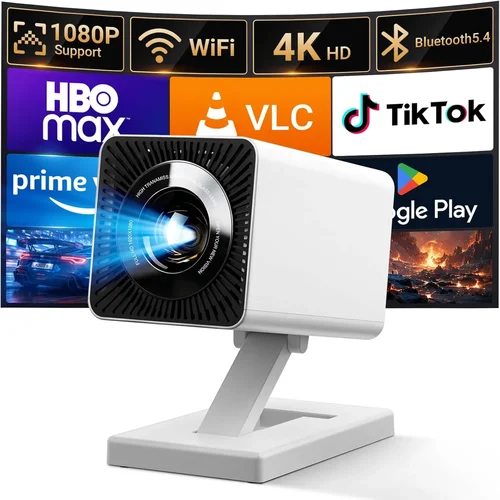
Modern projectors should support at least HDMI, USB, and a 3.5 mm audio jack. HDMI is essential for streaming sticks, gaming consoles, and laptops. USB ports can power media players or serve as a firmware update gateway. Some budget models also include a VGA port for older laptops. Wireless options like Bluetooth or Wi‑Fi are rare at this price point, but a few newer units are beginning to appear with basic screen‑mirroring capabilities.
6. Portability & Form Factor
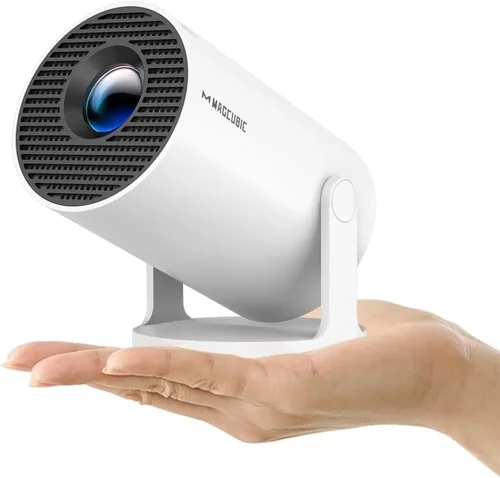
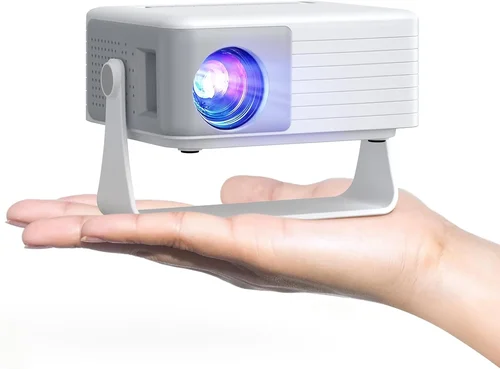
If you need a projector that travels with you—whether for classroom presentations or weekend movie nights—size and weight matter. Mini‑projectors (often called pico projectors) can weigh under 1 lb and fit in a backpack, but they usually sacrifice brightness. Larger “home theater” units may be bulkier but deliver higher lumens and better cooling. Decide which trade‑off aligns with your primary use.
7. Lamp Life & Maintenance
Projector lamps are consumable parts that dim over time. Most budget models use LED or laser light sources that promise 20,000‑30,000 hours of life, effectively eliminating the need for costly lamp replacements. Traditional UHP (Ultra‑High‑Performance) lamps can be cheaper upfront but may need replacement after 2,000‑3,000 hours, adding hidden costs. Check the advertised lamp life and factor it into your total cost of ownership.
8. Built‑in Audio
While external speakers deliver the best sound, many under‑$200 projectors include built‑in speakers ranging from 2 W to 5 W. These are adequate for casual movie nights or small presentations, but if you crave immersive audio you’ll want a separate sound system. Look for a projector with a 3.5 mm audio out or Bluetooth support for easy pairing.
Different Types of Buying Guide

Common Buying Mistakes to Avoid
❌ Mistake: Ignoring Ambient Light Conditions
Why it’s bad: Purchasing a 2,000‑lumens projector for a bright living‑room will result in a washed‑out image that defeats the purpose of a big screen.
What to do instead: Measure the typical lighting in your intended space. If you cannot fully darken the room, aim for at least 3,000 lumens or consider a projector with higher contrast.
❌ Mistake: Overlooking Native Resolution
Why it’s bad: A projector that advertises “1080p support” but only has a 720p native panel will upscale content, leading to softness and pixelation.
What to do instead: Choose a model with native 1080p if you plan to watch HD movies or play modern games. Otherwise, ensure 720p meets your content needs.
❌ Mistake: Forgetting About Lamp Life
Why it’s bad: Replacing a traditional lamp can cost $80‑$120, quickly eroding any savings from a cheap projector.
What to do instead: Prioritize LED or laser light sources that promise 20,000+ hours of use, effectively making lamp replacement a non‑issue.
❌ Mistake: Skipping the Connectivity Checklist
Why it’s bad: You might end up with a projector that only has VGA, forcing you to buy adapters for modern devices.
What to do instead: Verify that the unit includes at least one HDMI port, a USB‑C or USB‑A for media playback, and a 3.5 mm audio jack for external speakers.
❌ Mistake: Buying the Lightest Model Without Checking Heat Management
Why it’s bad: Ultra‑compact projectors often rely on passive cooling, which can cause overheating and shortened lifespan.
What to do instead: Look for models that mention active cooling (fan‑cooled) and read user reviews for any overheating complaints.
❌ Mistake: Assuming All “Budget” Projectors Are the Same
Why it’s bad: The $199 price tag can hide huge differences in image quality, build quality, and after‑sales support.
What to do instead: Compare specifications side‑by‑side, read multiple reviews, and consider brand reputation before finalizing.
Budget Guidelines: How Much Should You Spend?
- Entry-Level ($80‑$120): Expect 2,000 lumens, 720p resolution, basic HDMI, and modest contrast. Ideal for occasional movie nights in a dark room.
- Mid-Range ($130‑$170): You’ll find 1080p native panels, 3,000+ lumens, better contrast, and additional ports (USB‑C, audio out). This tier balances performance and price for most users.
- Premium ($170‑$200): Look for LED or laser light sources, 4,000 lumens, contrast ratios above 4,000:1, and sometimes built‑in battery packs for true portability.
- Luxury ($200+): While outside the strict “under $200” scope, some sales bring higher‑end models into reach. These often include advanced keystone correction, wireless mirroring, and superior optics.
Expert Tips for Getting the Best Deal
- Timing is everything: The best discounts appear during Black Friday, Cyber Monday, and back‑to‑school periods (July‑September).
- Buy from authorized sellers: This ensures you receive a valid warranty and access to official firmware updates.
- Check refurbished options: Certified refurbished units can be up to 30% cheaper and still include a full warranty.
- Bundle for savings: Some retailers offer HDMI cables, projector screens, or portable speakers at a reduced price when purchased together.
- Read the fine print on warranties: A two‑year warranty that covers the lamp is far more valuable than a one‑year limited warranty that excludes consumables.
- Test before you buy: If possible, visit a local electronics store to view the projector’s brightness and color accuracy in person.
- Consider future-proofing: Even if you don’t need a USB‑C port today, having one can be handy as newer laptops adopt this standard.

Frequently Asked Questions
Q: Can a projector under $200 display true 1080p without upscaling?
A: Yes, several models in the $150‑$200 range feature a native 1080p (1920×1080) DLP or LCD panel. Look for “native 1080p” in the specs; otherwise, the projector may only support 1080p via upscaling, which can soften the image.
Q: How far can I place a budget projector to get a 100‑inch image?
A: Most budget projectors have a throw ratio between 1.2:1 and 1.5:1. For a 100‑inch diagonal (≈87 in width), you’ll need roughly 8‑10 feet of distance. Some ultra‑short‑throw models exist, but they typically exceed $200.
Q: Are LED projectors better than lamp‑based ones at this price?
A: LED projectors generally offer longer lamp life and more stable colors, but they may sacrifice a bit of brightness compared to lamp‑based units. If you plan to use the projector in low‑light conditions and value low maintenance, an LED model is a solid choice.
Q: Do I need a separate screen?
A: A plain white wall works for casual use, but a dedicated projector screen improves brightness, contrast, and color accuracy. For under $200, a 100‑inch pull‑down screen can be found for $30‑$60.
Q: Can I connect a smartphone wirelessly?
A: Most sub‑$200 projectors lack native Wi‑Fi or Bluetooth. However, you can use a cheap HDMI or USB‑C dongle (e.g., Google Chromecast, Amazon Fire Stick) to stream wirelessly from a phone.
Q: What is keystone correction and do I need it?
A: Keystone correction digitally adjusts the image when the projector is not perfectly square to the screen, eliminating trapezoid distortion. It’s useful for flexible placement, but heavy use can degrade image sharpness.
Q: How loud are the fans on budget projectors?
A: Fan noise varies; most units run between 30‑35 dB at normal brightness. Look for models that advertise “quiet mode” if you plan to use the projector in a bedroom or during quiet presentations.
Q: Is there a difference between DLP and LCD at this price?
A: DLP projectors often deliver sharper contrast and better motion handling, while LCD units tend to have more accurate colors. Both technologies are viable under $200; choose based on which attribute matters more to you.
Our Final Recommendations
- Best for Budget‑Conscious Buyers: Vankyo Leisure 3 Mini Projector – $89. Offers 2,400 lumens, 720p native resolution, and a built‑in speaker. Ideal for dorm rooms and occasional movie nights.
- Best Overall Value: BenQ MW535A Home Theater Projector – $179. Provides 3,600 lumens, true 1080p, 4,500:1 contrast, and two HDMI ports. Balanced performance for movies and gaming.
- Best Premium Option: ViewSonic M2e LED Projector – $199 (often on sale). Features laser‑LED hybrid light source, 2,500 lumens, 1080p, and wireless screen mirroring via AirPlay.
- Best for Beginners: DR. J Professional Mini Projector – $119. Simple plug‑and‑play with HDMI, USB, and a lightweight design. Good for first‑time users.
- Best for Advanced Users: Epson EF‑100 Mini Laser Projector – Slightly above $200 but frequently discounted to $199. Laser light source, 2,000 lumens, Android TV integration, and excellent color accuracy.
Conclusion: Making the Right Choice
Choosing a digital projector under $200 doesn’t have to be a gamble. By focusing on the key factors—brightness, resolution, contrast, connectivity, and lamp life—you can pinpoint a model that fits your environment and use‑case. Remember to match the projector’s lumens to your typical lighting, prioritize native 1080p if you crave crisp detail, and verify that the warranty covers the most likely wear points.
Take advantage of seasonal sales, compare specifications side‑by‑side, and read real user feedback before you click “Add to Cart.” With the right research, you’ll enjoy a big‑screen experience without overspending, turning movie nights, gaming sessions, and presentations into memorable events.