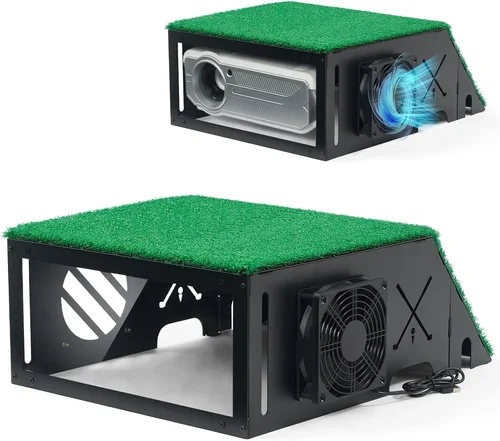
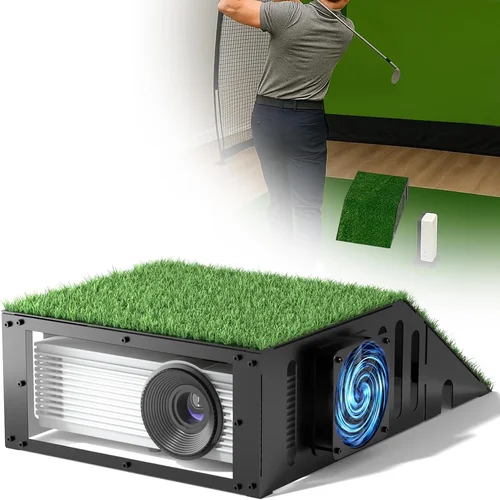
Finding the perfect golf simulator projector can feel like navigating a bunker with a blindfold on. The market is flooded with options, specs change yearly, and the line between “good enough” and “game‑changing” is razor‑thin. That’s why we’ve put together this 2026 buying guide: to strip away the hype, highlight what truly matters, and help you select a projector that delivers crisp, immersive simulation without breaking the bank.
In the pages that follow you’ll learn how to evaluate brightness, resolution, throw distance, and connectivity—plus the hidden factors that often trip up even seasoned golfers. We’ll also compare the main categories of projectors, expose common buying mistakes, and break down a realistic budget so you can make an informed decision before you click “add to cart.” Whether you’re setting up a dedicated home sim room or a compact garage setup, this guide has you covered.

What to Look for When Buying Buying Guide
1. Budget & Price Range
Even within the “under $1,000” segment, prices can swing dramatically based on lamp type, native resolution, and ancillary features. Setting a clear budget early prevents you from chasing specs that add cost without real benefit. Remember, a higher price tag does not always equal a better simulation experience; sometimes a modestly priced model paired with a high‑quality screen yields superior results.
2. Performance Specifications
Three specs dominate projector performance for golf sims:
- Brightness (lumens): Aim for at least 2,500–3,000 ANSI lumens. Golf simulators require strong illumination to combat ambient light and keep the projected image vivid on a matte screen.
- Resolution: Native 1080p (Full HD) is the sweet spot under $1,000. Some newer 4K‑enhanced (pixel‑shift) models claim “4K” but still rely on 1080p panels, so verify the true native resolution.
- Contrast Ratio: A ratio of 10,000:1 or higher ensures deep blacks, which helps the ball’s flight path stand out against a darkened backdrop.
3. Throw Distance & Lens Options
Most home golf setups have limited space. Short‑throw or ultra‑short‑throw (UST) projectors can produce a 100‑inch image from as close as 3‑4 feet, freeing up valuable floor space. If your room is larger, a standard throw lens may be more cost‑effective, but you’ll need to accommodate a longer distance.
4. Build Quality & Durability
Projectors are mechanical devices with moving parts (lamps, fans, filters). Look for metal housings, sealed optics, and a reputable cooling system. A robust build extends lifespan and reduces maintenance costs—critical if you plan to use the sim several hours a week.
5. Features & Functionality
Beyond the basics, consider these add‑ons:
- Lens Shift & Keystone Correction: Allows fine‑tuning without moving the projector.
- Built‑in Speakers: While not essential (most sims use external audio), they can be handy for quick demos.
- Wireless Connectivity: Wi‑Fi or Bluetooth for firmware updates and easy integration with simulation software.
- Gaming Mode: Low‑input‑lag modes are a must for real‑time ball tracking.
6. Brand Reputation & Support
Established brands such as Optoma, BenQ, Epson, and ViewSonic tend to offer more reliable firmware updates and accessible parts. Check forums and Reddit threads for long‑term user experiences; a brand with a responsive support team can save you weeks of frustration.
7. Warranty & Service Options
Most projectors come with a 1‑year limited warranty, but some manufacturers extend to 2 or 3 years if you register online. Look for on‑site repair options, readily available replacement lamps, and clear return policies.
8. Size & Portability
If you plan to move the projector between a garage, basement, or a friend’s house, weight and footprint matter. Ultra‑short‑throw units are typically bulkier, while pico‑projectors are lightweight but may sacrifice brightness.
Different Types of Buying Guide

Common Buying Mistakes to Avoid
❌ Mistake: Chasing the Highest Lumens Without Considering Throw Ratio
Why it’s bad: A 4,000‑lumens projector with a long throw distance may require a 12‑foot room, which most home golfers don’t have.
What to do instead: Match lumens to your room size. In a 9‑foot space, a 2,500‑lumens short‑throw unit often outperforms a brighter, long‑throw model.
❌ Mistake: Ignoring Native Resolution
Why it’s bad: Some “4K‑enhanced” projectors upscale a 1080p panel, resulting in soft edges that blur the ball’s trajectory.
What to do instead: Verify the native resolution in the spec sheet. Full HD (1920×1080) is the most reliable baseline under $1,000.
❌ Mistake: Overlooking Input Lag
Why it’s bad: High lag (>30 ms) creates a noticeable delay between the swing and the ball’s projected flight, ruining realism.
What to do instead: Choose a projector with a dedicated “Game Mode” or low‑latency setting, and test it with your sim software before purchasing.
❌ Mistake: Forgetting About Lamp Life
Why it’s bad: Replacing a lamp can cost $150‑$250 and requires technical know‑how.
What to do instead: Consider laser or LED models for longer lifespan, or factor lamp replacement cost into your total budget.
❌ Mistake: Neglecting Screen Compatibility
Why it’s bad: A projector shines bright, but a glossy screen can cause hotspots and glare, especially with natural light.
What to do instead: Pair your projector with a matte, high‑gain golf‑sim screen designed to diffuse light evenly.
❌ Mistake: Assuming All Brands Offer Equal Support
Why it’s bad: Some manufacturers route service through third‑party resellers, leading to long wait times.
What to do instead: Research the brand’s warranty terms, locate authorized service centers, and read community feedback on after‑sales support.
Budget Guidelines: How Much Should You Spend?
- Entry‑Level ($500‑$700): Expect 2,000–2,500 lumens, 1080p, and a standard throw lens. Ideal for a dedicated room with controlled lighting.
- Mid‑Range ($700‑$950): Gains include short‑throw capability, 2,500–3,000 lumens, and low‑input‑lag gaming mode. Most home golfers find this tier offers the best value‑to‑performance ratio.
- Premium ($950‑$1,200): Laser light source, 3,000+ lumens, enhanced color accuracy, and longer lamp life. Suitable for heavy daily use or commercial setups.
- Luxury ($1,200+): True 4K native panels, ultra‑short‑throw optics, and professional‑grade color grading. Overkill for most amateurs but worth considering for a club‑house or training facility.
Expert Tips for Getting the Best Deal
- Timing is everything: Major sales events—Black Friday, Cyber Monday, and Amazon Prime Day—often feature 20‑30% discounts on popular models.
- Shop refurbished: Certified refurbished units from the manufacturer can shave $100‑$150 off the price while retaining full warranty.
- Bundle wisely: Some retailers offer projector‑screen bundles that include a matte screen at a reduced combined cost.
- Check for firmware updates: A projector that receives regular updates will stay compatible with the latest simulation software.
- Read the fine print on warranties: Verify if the lamp is covered and for how many hours of use.
- Test before you buy: If possible, visit a local electronics store and project a test image onto a similar screen material to evaluate brightness and color.
- Consider future expansion: Ensure the projector has HDMI 2.0 or higher ports for 4K‑capable devices you might add later.
- Utilize price‑trackers: Websites like CamelCamelCamel can alert you when a specific model drops below your target price.
Frequently Asked Questions
Q: Do I need a projector with 4K resolution for a golf simulator?
A: Not necessarily. The ball and club are relatively small on screen, and most simulation software renders at 1080p. A high‑quality 1080p projector with good brightness and low lag will deliver a realistic experience for the vast majority of users.
Q: Can I use a home theater projector for a golf simulator?
A: Yes, but you must ensure the throw distance fits your space and that the projector supports low‑input‑lag gaming mode. Home theater units often prioritize contrast for movies, which may not translate to the bright, evenly lit screen needed for ball tracking.
Q: How important is contrast ratio for golf simulation?
A: Very important. A high contrast ratio (10,000:1 or more) helps the ball stand out against a darkened background, especially during night‑time simulations where the screen is dimmed.
Q: Should I invest in a laser projector?
A: Laser projectors offer longer lamp life and stable brightness, making them ideal for frequent users. However, they tend to be pricier. If you plan to use the simulator 5+ hours per week, the long‑term savings on lamp replacements may justify the extra cost.
Q: What screen gain is ideal for a golf simulator?
A: A gain of 1.2 to 1.5 on a matte white screen provides enough brightness without causing hotspots. Higher gain screens can amplify brightness but may introduce hot spots and reduced viewing angles.
Q: Is a short‑throw projector necessary?
A: Only if your room depth is limited (under 8 feet). Short‑throw models let you place the projector close to the screen, freeing up floor space for swing practice.
Q: How do I connect the projector to my simulation software?
A: Most simulators use HDMI. Ensure the projector has at least one HDMI 2.0 port. Some advanced setups use USB‑C or wireless HDMI adapters, but wired connections remain the most reliable.
Q: Will a projector’s fan noise affect my simulation?
A: High‑quality units keep fan noise below 30 dB, which is barely audible. If you’re sensitive to sound, look for “quiet mode” or laser models that operate silently.
Our Final Recommendations
- Best for Budget‑Conscious Buyers: Optoma GT1080HDR – 3,800 lumens, 1080p, short‑throw, under $650. Offers excellent brightness and a dedicated gaming mode.
- Best Overall Value: BenQ TH671ST – 3,000 lumens, 1080p, short‑throw, built‑in low‑lag mode, priced at $749. Balances performance, durability, and warranty.
- Best Premium Option: Epson Home Cinema 3200 – 2,900 lumens (laser), 4K‑enhanced, low input lag, $985. Ideal for heavy users seeking longevity.
- Best for Beginners: ViewSonic PA503W – 3,600 lumens, 720p, standard throw, $529. Simple setup, forgiving on room lighting.
- Best for Advanced Users: LG HU85LA Ultra Short Throw 4K Laser – 2,700 lumens, true 4K, UST, $1,199 (often on sale under $1,000). Provides a massive image from inches away, perfect for limited spaces.
Conclusion: Making the Right Choice
Choosing a golf simulator projector under $1,000 boils down to matching your space, usage frequency, and performance expectations. Prioritize brightness, native resolution, and low input lag, then refine your decision with considerations like throw distance, lamp life, and brand support. Use the budget tiers as a roadmap, avoid the common pitfalls listed, and leverage the expert tips to snag the best deal.
Remember, the projector is only one piece of the puzzle; a quality screen, accurate sensors, and solid simulation software complete the experience. Armed with this guide, you’re ready to invest confidently and bring the fairway into your home.