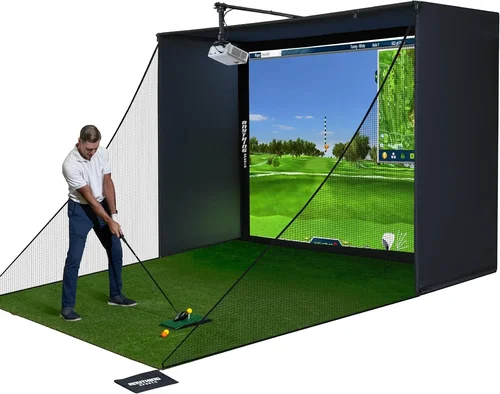
Welcome to the ultimate guide for anyone looking to bring a realistic golf experience into the comfort of their own home without blowing the budget. In recent years, the market for golf simulators has exploded, and the projector—often the unsung hero—plays a pivotal role in how true‑to‑life your swing feels. Whether you’re a weekend warrior polishing your short game or a serious player looking to track shot data year‑round, choosing the right projector under $2,000 can make or break the experience.
In this guide we’ll walk you through every factor that matters, compare the most common projector categories, expose the typical pitfalls, and hand you a set of actionable tips so you can buy with confidence. By the end, you’ll know exactly which models deliver crisp imagery, low lag, and the durability needed for repeated golf sessions—all while staying comfortably within a $2,000 budget.

What to Look for When Buying Buying Guide
1. Budget & Price Range
Even though the headline says “under $2,000,” the price spectrum inside that range is wide. Entry‑level units hover around $800, while high‑end models approach the $2,000 ceiling. Knowing how much you’re willing to invest helps you prioritize features—do you need 4K resolution, or is a 1080p model with superior brightness enough for your space? Set a realistic ceiling, then allocate percentages to key specs (e.g., 30% for brightness, 25% for throw distance). This prevents you from overspending on a single feature that won’t noticeably improve your swing practice.
2. Performance Specifications
The core specs that influence image quality are:
- Resolution: 1080p is generally sufficient for most indoor setups; 4K offers sharper detail but often requires a larger screen and higher brightness.
- Brightness (lumens): For a dedicated golf simulator room with controlled lighting, 3,000–4,000 ANSI lumens is ideal. If you plan to use the projector in a brighter area, aim for 4,500+ lumens.
- Contrast Ratio: A higher contrast ratio produces deeper blacks, making the simulated sky look more realistic. Look for at least 10,000:1.
- Refresh Rate & Input Lag: Golf simulators demand low lag (under 30 ms) and a refresh rate of 60 Hz or higher to keep ball flight smooth.
- Throw Ratio: Determines how far the projector needs to be from the screen. Short‑throw models (0.8–1.2:1) are perfect for limited spaces.
3. Build Quality & Durability
Projectors used for golf simulators often stay on for extended periods—sometimes 2–3 hours per session. Look for a robust chassis, heat‑dissipating fans, and reliable lamp or laser light sources. Laser projectors, while slightly pricier, tend to have longer life spans (20,000+ hours) and maintain consistent brightness over time.
4. Features & Functionality
Beyond raw image specs, consider these add‑ons:
- Lens Shift & Zoom: Allows fine‑tuning without moving the projector.
- Keystone Correction: Helpful for uneven mounting but can degrade image quality if overused.
- Built‑in Speakers: Useful for casual play, though most serious golfers pair the projector with an external sound system.
- Connectivity: HDMI 2.0/2.1, USB‑C, and wireless options (Miracast, AirPlay) give you flexibility with simulation software.
- HDR Support: Enhances color depth; not essential for golf but a nice bonus for movie nights.
5. Brand Reputation
Established brands like Epson, Optoma, BenQ, and ViewSonic have proven track records for reliability and service. Newer entrants may offer tempting specs at lower prices, but research their warranty policies and post‑sale support before committing.
6. Warranty & Support
A solid warranty (minimum 2 years) protects you against premature failures. Verify whether the warranty covers the lamp/laser module, and check if the manufacturer offers on‑site service or a network of authorized repair centers. Online forums and user groups can also be a barometer of how responsive a brand’s support team truly is.
7. Size & Portability (if applicable)
Some golfers like to move the simulator between a garage, basement, and a spare room. In such cases, weight and footprint matter. Short‑throw, compact models can be mounted on a ceiling bracket or placed on a portable cart for easy relocation.
8. User Reviews & Ratings
Before finalizing a purchase, skim through Amazon, B&H, and specialized golf forums. Look for recurring comments about heat issues, lamp lifespan, or software compatibility. Real‑world feedback often reveals quirks that spec sheets hide.
Different Types of Buying Guide

Common Buying Mistakes to Avoid
❌ Mistake: Ignoring Room Lighting
Why it’s bad: A projector rated for 3,000 lumens can look washed out in a sunny garage, ruining the realism of the simulation.
What to do instead: Measure ambient light levels and aim for a projector with at least 20 % more lumens than the brightest condition you expect.
❌ Mistake: Over‑focusing on Resolution Alone
Why it’s bad: A 4K projector with low brightness or high input lag will feel sluggish and dim, negating the benefit of higher pixel count.
What to do instead: Balance resolution with brightness, contrast, and lag. For most indoor setups, a bright 1080p model often outperforms a dim 4K unit.
❌ Mistake: Forgetting Throw Ratio Compatibility
Why it’s bad: Buying a standard‑throw projector for a 6‑ft deep garage forces you to place the unit too far back, leaving no room for a hitting mat.
What to do instead: Calculate the required throw distance (screen width ÷ throw ratio) and match it to your room’s dimensions before purchasing.
❌ Mistake: Skipping Warranty Details
Why it’s bad: A cheap projector may fail after six months, and without a solid warranty you’ll face costly replacements.
What to do instead: Choose models with at least a 2‑year warranty covering the light source. Register the product immediately after purchase.
❌ Mistake: Overlooking Compatibility with Simulation Software
Why it’s bad: Some projectors have limited HDMI ports or lack HDCP 2.2, causing issues with popular platforms like Golfzon, SkyTrak, or TruGolf.
What to do instead: Verify that the projector supports the required HDMI version and any specific DRM requirements of your chosen software.
❌ Mistake: Buying the Cheapest Lens Shift
Why it’s bad: Minimal lens shift can force you into awkward ceiling angles, leading to keystone distortion.
What to do instead: Opt for at least ±10 % vertical and horizontal lens shift, or plan a true‑center ceiling mount.
Budget Guidelines: How Much Should You Spend?
- Entry‑Level ($800‑$1,200): Expect 1080p resolution, 3,000–3,500 lumens, and basic connectivity. Ideal for hobbyists who play a few times a month.
- Mid‑Range ($1,200‑$1,600): You’ll find short‑throw models with 1080p or 2K resolution, higher contrast ratios, and improved fan cooling for longer sessions.
- Premium ($1,600‑$2,000): This tier introduces true 4K laser projectors, ultra‑short‑throw optics, and the lowest input lag on the market—perfect for serious practice and multi‑user households.
- Luxury ($2,000+): While outside the guide’s primary focus, luxury options add 8K support, built‑in AI upscaling, and integrated soundbars, turning the room into a full entertainment hub.
Expert Tips for Getting the Best Deal
- Timing: Purchase during major sales events (January clearance, mid‑summer “back‑to‑school” promos) when retailers clear inventory.
- Where to Buy: Authorized dealers (B&H, Adorama, Amazon “Ships from and sold by” the brand) guarantee genuine warranty coverage.
- Spotting Deals: Use price‑tracking extensions like CamelCamelCamel to monitor fluctuations and set alerts for your target model.
- Warranty Extensions: Some retailers offer discounted extended warranties—evaluate the cost versus the projector’s expected lamp life.
- Return Policies: Ensure a minimum 30‑day return window; this gives you time to test the projector with your simulation software.
- Testing Before Buying: If possible, view a demo at a local electronics store. Bring a laptop with your simulation software to assess lag and color fidelity on‑site.
- Bundle with Screen: A high‑gain, matte white screen (120‑150 gain) dramatically improves perceived brightness, often more cost‑effective than a pricier projector.
- Consider Refurbished: Manufacturer‑refurbished units come with full warranty and can save 15‑25 % while still offering like‑new performance.

Frequently Asked Questions
Q: Do I need a 4K projector for a golf simulator?
A: Not necessarily. Golf simulators rely on accurate ball flight data rather than ultra‑sharp image detail. A bright 1080p projector with low input lag typically provides a more realistic experience than a dim 4K unit. Upgrade to 4K only if you also plan to use the space for home theater purposes.
Q: What throw distance is ideal for a 10‑ft wide screen?
A: For a 10‑ft (120‑inch) screen, a short‑throw projector with a 0.9:1 ratio needs to be roughly 9 ft away. An ultra‑short‑throw (0.4:1) can sit just 4 ft away, ideal for tight garages.
Q: How important is input lag for golf?
A: Very important. High lag can cause a noticeable delay between the swing and the ball’s flight, disrupting timing. Aim for <30 ms lag; most modern 1080p projectors meet this, while some 4K models may exceed 40 ms.
Q: Can I use a projector with a TV screen?
A: Yes, but a TV’s reflective surface reduces contrast and can cause hotspotting. A dedicated projection screen (matte white or gray) yields better color accuracy and uniform brightness.
Q: Should I choose laser or lamp?
A: Laser projectors have longer light‑source life (20,000+ hours) and maintain consistent brightness, making them ideal for frequent use. Lamp‑based units are cheaper initially but require lamp replacements every 2,000–4,000 hours.
Q: How far should the projector be from the screen for optimal focus?
A: Follow the manufacturer’s recommended throw distance chart. Typically, staying within ±5 % of the ideal distance ensures sharp focus without frequent keystone correction.
Q: Is a ceiling mount necessary?
A: Not mandatory, but a ceiling mount keeps the projector out of the way, reduces accidental knocks, and often provides the cleanest image geometry, especially for short‑throw units.
Q: Will a projector work with outdoor simulators?
A: Outdoor use is challenging due to ambient light. If you must, choose a high‑lumens (5,000+), laser‑based projector with a weather‑sealed housing, and use a blackout screen.
Q: Do I need special cables?
A: High‑speed HDMI 2.0 cables (6 Gbps+) are sufficient for 1080p at 60 Hz. For 4K 60 Hz, use HDMI 2.1 or certified 18‑Gbps cables to avoid bandwidth bottlenecks.
Our Final Recommendations
- Best for Budget‑Conscious Buyers: Optoma GT1080HDR – 3,800 lumens, 0.5:1 throw ratio, 1080p, under $1,000. Excellent brightness for garage setups and low input lag.
- Best Overall Value: Epson Home Cinema 2150 – 2,500 lumens, 1080p, lens shift, and built‑in wireless. Slightly higher price (~$1,300) but offers superior color accuracy and a robust warranty.
- Best Premium Option: BenQ LK970 – 4,000 lumens laser, true 4K, 0.9:1 short‑throw, 10,000:1 contrast. Perfect for dedicated rooms, priced near $1,950.
- Best for Beginners: ViewSonic M1 Mini Plus – Portable LED pico, 120 lumens, 1080p, built‑in battery. Great for pop‑up setups and learning the basics.
- Best for Advanced Users: LG HU85LA Ultra‑Short‑Throw 4K Laser – 2,700 lumens, 0.19:1 throw, 4K, AI‑enhanced upscaling. Though slightly above $2,000, many retailers discount it into range during sales.
Conclusion: Making the Right Choice
Choosing the best golf simulator projector under $2,000 boils down to matching your space, usage frequency, and performance expectations. Prioritize brightness and low input lag first, then decide whether 1080p or 4K best suits your ancillary entertainment plans. Remember to verify throw ratio, check warranty terms, and read real‑world user feedback before sealing the deal.
Armed with the factors, comparisons, and tips outlined above, you’re ready to invest confidently and turn any room into a year‑round practice haven. Happy swinging, and may your virtual fairways be as crisp as the projector you choose!