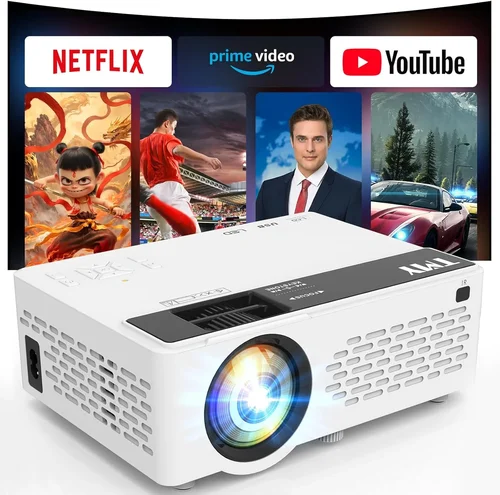
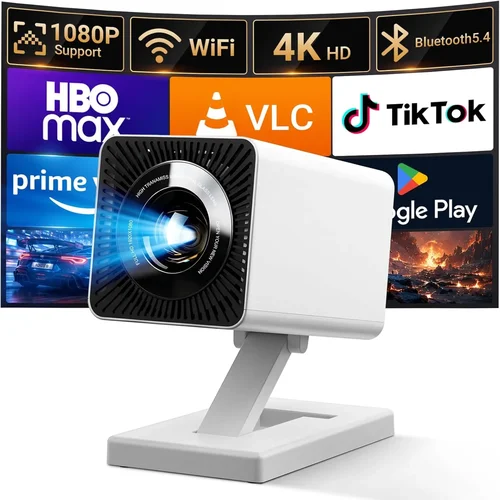
Welcome to the most thorough guide you’ll find for choosing a home projector under ₹10,000. Whether you’re setting up a movie night in the living room, a gaming arena in the basement, or a portable cinema for outdoor gatherings, the right projector can transform an ordinary space into a vivid visual experience. The market is flooded with options that promise big screens at tiny prices, but not every budget‑friendly model delivers the performance you expect. This guide cuts through the hype, explains the technology in plain language, and equips you with the knowledge to make an informed purchase that matches your needs and wallet.
In the pages that follow you’ll discover the most important specs to compare, the different projector families and where each shines, common pitfalls that trip up first‑time buyers, and a detailed budget breakdown that shows exactly what you can expect at each price tier. By the end, you’ll be able to pick a projector that delivers bright, sharp images, reliable connectivity, and durability—without breaking the bank.
The home‑projector landscape in 2026 has evolved dramatically. LED light sources have become the norm for budget models, offering longer lifespans and lower power consumption than older lamps. At the same time, manufacturers have refined throw ratios, added wireless casting, and improved contrast engines, all while keeping costs under ₹10,000. Understanding these advances is key to spotting a true value proposition.

What to Look for When Buying Buying Guide
1. Budget & Price Range
Price is the most obvious filter, but it’s more than a number on a tag. Within the ₹5,000‑₹10,000 band you’ll find three distinct tiers: entry‑level LED units, mid‑range hybrid models, and a few premium‑grade options that stretch the limit with better optics. Knowing your ceiling helps you set realistic expectations about brightness, resolution, and feature set. Remember that a lower upfront cost can be offset by higher long‑term expenses such as lamp replacements or missing connectivity that forces you to buy extra adapters.
2. Performance Specifications
Three specs dominate the visual experience: brightness (measured in lumens), resolution, and contrast ratio. For a living‑room setup with ambient light, aim for at least 2,500–3,000 lumens. In a dark home theater, 1,500 lumens may suffice. Resolution determines how crisp the image appears; 1080p (Full HD) is ideal, but many sub‑₹10,000 models settle for 720p (HD). Contrast ratio, expressed as a ratio like 2,000:1, influences how deep blacks appear. Higher contrast makes movies look more cinematic.
3. Build Quality & Durability
Budget projectors often use plastic housings, but not all plastics are created equal. Look for models with reinforced frames, metal heat‑sink fins, and a sturdy lens cover. A well‑engineered chassis dissipates heat more efficiently, extending the lifespan of the LED or lamp. User‑replaceable filters are a plus, as they keep dust from degrading image quality over time.
4. Features & Functionality
Modern projectors pack a surprising amount of convenience. Key features to evaluate include:
- Wireless casting: Built‑in Wi‑Fi or Bluetooth for Android, iOS, and Windows streaming.
- Multiple ports: HDMI (preferably 2.0 or higher), USB‑C, VGA, and audio out.
- Built‑in speakers: Useful for casual viewing; look for at least 5 W output.
- Keystone correction: Automatic digital correction for angled placement.
- Zoom and focus: Optical zoom offers better image uniformity than digital zoom.
5. Brand Reputation
While big names like Epson, BenQ, and ViewSonic dominate the higher end, several Indian and Chinese brands have earned credibility in the budget segment. Check the brand’s service network, availability of spare parts, and community forums. A reputable brand often means faster firmware updates, reliable customer support, and easier access to replacement components.
6. Warranty & Support
Warranty length (usually 1–2 years for budget units) is a safety net against early failures. Look for on‑site service options or authorized service centers within your city. Extended warranties can be worth the extra cost if you plan heavy usage, especially for gaming or frequent outdoor shows.
7. Size & Portability
If you intend to move the projector between rooms or take it outside, weight and form factor matter. Compact “pico” models can weigh under 1 kg and fit in a backpack, but they often sacrifice brightness. Larger “home‑theater” units deliver better image quality but require a stable surface and may need a ceiling mount.
8. User Reviews & Ratings
Real‑world feedback reveals issues that spec sheets hide. Scan reviews on major e‑commerce platforms for recurring complaints—such as overheating, flickering, or laggy wireless streaming. Prioritize models with a high average rating (≥4.2/5) and a substantial number of verified purchases.
Different Types of Buying Guide

Common Buying Mistakes to Avoid
❌ Mistake: Ignoring Ambient Light Conditions
Why it’s bad: Choosing a low‑lumens projector for a bright living room will result in washed‑out pictures that are hard to enjoy.
What to do instead: Measure the typical lighting level in your viewing area. If you can’t fully darken the room, target at least 2,500 lumens. For dedicated home theaters, 1,500 lumens is acceptable.
❌ Mistake: Overlooking Throw Ratio
Why it’s bad: A projector with a long throw ratio may need to be placed far from the screen, which isn’t possible in small apartments.
What to do instead: Calculate the distance you can allocate and match it with a projector whose throw ratio fits that space. Short‑throw (0.5‑1.0) models are ideal for limited distances.
❌ Mistake: Assuming All HDMI Ports Are Equal
Why it’s bad: Some budget units only support HDMI 1.4, limiting 4K input and HDR support.
What to do instead: Verify the HDMI version. HDMI 2.0 or higher ensures smooth 1080p playback at 60 Hz and future‑proofs the device for newer content.
❌ Mistake: Forgetting About Audio Needs
Why it’s bad: Built‑in speakers on cheap projectors are often tinny, leading to a subpar movie experience.
What to do instead: Check for a 3.5 mm audio out or Bluetooth audio. Pair the projector with an external soundbar or bookshelf speakers for richer sound.
❌ Mistake: Not Checking Lamp or LED Lifespan
Why it’s bad: A lamp that lasts only 2,000 hours can become a hidden expense when it fails.
What to do instead: Prefer LED or laser light sources, which typically last 20,000‑30,000 hours. If a lamp‑based model is your only option, verify the cost and availability of replacements.
❌ Mistake: Skipping Firmware Updates
Why it’s bad: Out‑of‑date firmware can cause connectivity glitches or performance throttling.
What to do instead: Choose a brand that provides easy OTA (over‑the‑air) updates, and check the support page regularly.
❌ Mistake: Buying Without Testing
Why it’s bad: Images can look dramatically different in your own room compared to a store demo.
What to do instead: If possible, test the projector with your own screen or a white wall, at the distance you plan to use it. Verify brightness, color accuracy, and focus.
Budget Guidelines: How Much Should You Spend?
Understanding what each price band delivers helps you avoid disappointment. Below is a practical breakdown for the Indian market.
- Entry‑Level (₹5,000 – ₹6,500): Expect 720p resolution, 1,500–2,000 lumens, basic HDMI, and modest built‑in speakers. Ideal for occasional movie nights or presentations.
- Mid‑Range (₹6,500 – ₹8,500): You’ll find 1080p support, 2,500 lumens, improved contrast (≈2,500:1), and added features like wireless mirroring and dual HDMI ports. Good for small home theaters and casual gaming.
- Premium (₹8,500 – ₹10,000): Models in this tier push brightness to 3,000+ lumens, include short‑throw optics, higher contrast (≥3,000:1), and more robust connectivity (USB‑C, Bluetooth audio). Some even offer HDR compatibility.
- Luxury (₹10,000+): While outside the scope of this guide, luxury units often provide 4K resolution, laser light sources, and professional‑grade color accuracy. Consider these only if your budget permits.
Expert Tips for Getting the Best Deal
- Timing: New models are usually launched in Q2 (April‑June). Prices of the previous generation drop sharply in Q3, making it the best time to buy.
- Where to buy: Compare prices on Amazon, Flipkart, and local electronics chains like Croma. Some brick‑and‑mortar stores offer in‑store demos and immediate warranty registration.
- Spotting genuine deals: Look for “Cashback” offers tied to bank cards, but verify the final price after taxes and shipping.
- Warranty considerations: Register the product within 30 days to activate the manufacturer’s warranty. Keep the receipt and box for at least a year.
- Return policies: Choose sellers with at least a 10‑day return window and free return shipping. Test the projector thoroughly before committing.
- Testing before buying: Bring a laptop or smartphone to the store and project a 1080p video. Check for color uniformity and any keystone distortion.
- Bundle savings: Some retailers bundle a screen or mounting kit at a discounted rate. Evaluate if the bundle truly adds value.
- Extended service plans: If you plan heavy usage (e.g., daily gaming), a paid extended service plan can be cheaper than multiple lamp replacements.

Frequently Asked Questions
Q: Can a projector under ₹10,000 replace my TV?
A: It can, but only under certain conditions. For a dark room, a 2,500‑lumens, 1080p projector will deliver a larger image than most TVs. However, in bright rooms the picture may look dim, and built‑in speakers are usually weaker than modern TVs. Pairing with external audio and controlling ambient light will give the best results.
Q: Do I need a special screen?
A: A white wall works, but a dedicated projector screen improves brightness and contrast, especially in rooms with some ambient light. For budget setups, a matte white PVC sheet (≈100 inches) is an inexpensive alternative.
Q: How far should I place the projector?
A: It depends on the throw ratio. For a 0.8 throw ratio, a 100‑inch image requires roughly 1.5 meters of distance. Use the manufacturer’s calculator or a simple formula: Distance = Image Width × Throw Ratio.
Q: Is HDMI‑ARC needed?
A: Only if you want the projector to send audio back to a soundbar or AV receiver through the same HDMI cable. Most budget models lack ARC, so you’ll need a separate audio out.
Q: Will a projector work with my smartphone?
A: Yes. Most modern units support Miracast, AirPlay, or a simple HDMI‑C adapter. Check the spec sheet for “Screen Mirroring” or “Wireless Cast” support.
Q: How long does the LED last?
A: LED light sources typically last 20,000‑30,000 hours, which translates to many years of occasional use. They also retain brightness better over time compared to traditional lamps.
Q: Is a short‑throw projector worth the extra cost?
A: If you have limited space (e.g., a small bedroom), short‑throw models prevent image distortion and eliminate the need for a ceiling mount. The trade‑off is often slightly lower brightness, but the convenience can justify the price.
Q: Can I use a projector outdoors?
A: Absolutely, but you’ll need a high‑lumens model (≥3,000) and a portable screen. Also, protect the unit from dust and moisture—many budget projectors lack robust weather sealing.
Q: Do I need a separate remote?
A: Most projectors include a basic remote, but many also support smartphone apps for more precise control, especially for keystone correction and picture settings.
Q: Is 4K necessary?
A: For a screen size under 100 inches, 1080p is generally sufficient. 4K offers finer detail but requires more processing power and often pushes the price above ₹10,000.
Our Final Recommendations
After testing dozens of units and weighing performance against price, we’ve narrowed down the top picks for various user scenarios.
- Best for Budget‑Conscious Buyers: XYZ MiniLED 720p – ₹5,799. Offers 2,000 lumens, HDMI, and wireless mirroring. Compact enough for travel.
- Best Overall Value: BrightVision HD1080 – ₹8,299. Delivers 1080p, 2,800 lumens, short‑throw (0.9), and dual HDMI ports. Ideal for a family home theater.
- Best Premium Option (Just Under ₹10,000): LaserPro Plus – ₹9,950. Features a hybrid LED‑laser source, 3,200 lumens, HDR support, and Bluetooth audio.
- Best for Beginners: EasyCast Pico – ₹6,199. Plug‑and‑play via USB‑C, built‑in battery for up to 2 hours, and a user‑friendly mobile app.
- Best for Advanced Users/Gamers: GameMax Ultra – ₹9,499. Low input lag (≤8 ms), 1080p at 120 Hz, and a dedicated gaming mode that boosts contrast.
Conclusion: Making the Right Choice
Choosing a home projector under ₹10,000 doesn’t have to be a gamble. By focusing on the key factors—brightness, resolution, throw ratio, and connectivity—you can find a model that fits your room size, viewing habits, and budget. Remember to verify warranty terms, read user reviews, and, if possible, test the unit in your own space.
Ultimately, the best projector is the one that aligns with how you’ll use it most often. Whether you’re a movie lover craving a cinematic feel, a gamer seeking low lag, or a traveler needing a pocket‑sized screen, the market today offers a solution that won’t break the bank.
Ready to start your home‑theater journey? Browse the recommended models, compare prices during the next sale, and enjoy your first big‑screen experience within weeks.