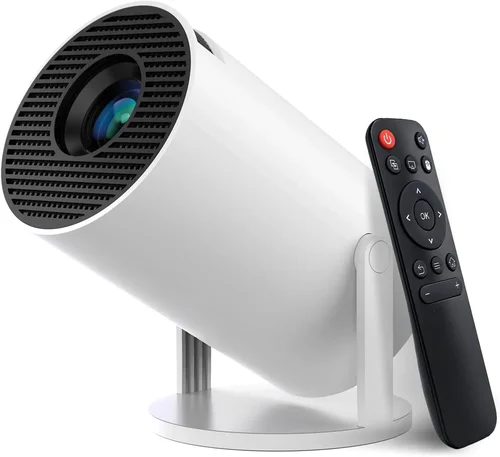
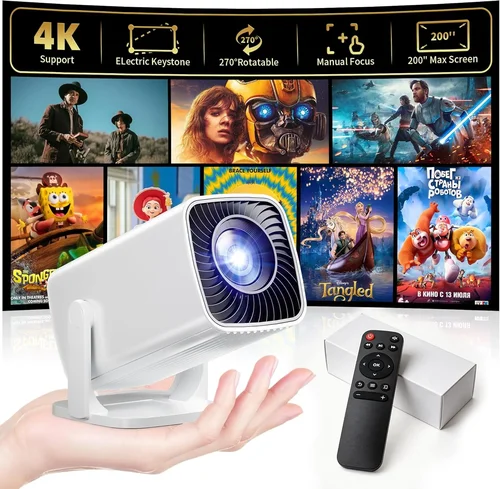
Finding a mini projector that delivers decent picture quality without breaking the bank can feel like hunting for a needle in a haystack. The market is flooded with gadgets that promise cinema‑like experiences for the price of a dinner out, yet many fall short on brightness, durability, or ease of use. That’s why this guide exists – to cut through the hype and give you a clear, expert‑driven roadmap for picking the best mini projector under $100.
In the pages that follow you’ll learn which technical specs really matter, how to match a projector to your lifestyle, and which common pitfalls to avoid. We’ll also break down the different projector categories, show you realistic budget expectations, and hand‑pick the top models that consistently outperform their price class. By the end, you’ll be equipped to make a confident purchase that fits your pocket and your viewing habits.
The mini projector segment has matured quickly over the past few years. Advances in LED light sources, DLP chips, and battery technology have pushed prices down while raising performance. As of 2026, you can expect a sub‑$100 unit to deliver at least 80 lumens, native 720p resolution, built‑in speakers, and wireless connectivity – features that were premium just a couple of years ago. Let’s dive into the details that separate the truly usable devices from the gimmicks.

What to Look for When Buying Buying Guide
1. Budget & Price Range
When you set a hard ceiling of $100, you automatically limit the pool of options. However, price alone doesn’t dictate quality. Look for models that consistently score high on user reviews for durability and picture performance within that bracket. A good rule of thumb is to allocate roughly 40% of your budget to the projector itself, leaving room for accessories such as a portable screen, HDMI cable, or a power bank.
2. Performance Specifications
Key specs include brightness (measured in lumens), native resolution, and contrast ratio. For mini projectors under $100, aim for at least 80‑100 lumens – enough for dim rooms or backyard evenings. Native 720p (1280×720) is the sweet spot; many budget units upscale 1080p content but display it at a lower quality. Contrast ratio matters less in bright environments but can improve depth in darker scenes.
3. Build Quality & Durability
Cheap plastics can crack or warp after a few trips. Check for reinforced chassis, rubberized corners, and a sturdy lens cover. A well‑designed heat‑sink and fan system prevents overheating, which is a common failure point in low‑cost projectors. Look for models that have passed at least 10,000‑hour runtime tests – many manufacturers publish these figures in the spec sheet.
4. Features & Functionality
Modern mini projectors often pack wireless options (Wi‑Fi, Bluetooth), USB‑C power delivery, and built‑in media players. Prioritize the features you’ll actually use. If you stream from a phone, Bluetooth audio output and a Wi‑Fi dongle are essential. For occasional movie nights, an HDMI port and a built‑in speaker may suffice.
5. Brand Reputation
Established brands such as Anker, Vankyo, and AAXA have a track record of delivering reliable units and honoring warranties. Newer entrants can surprise with innovative designs, but they may lack long‑term support. Research brand forums, Reddit threads, and YouTube reviews to gauge real‑world reliability.
6. Warranty & Support
A solid warranty (minimum 12 months) indicates confidence from the manufacturer. Look for easy‑to‑reach customer service, downloadable firmware updates, and a clear return policy. Some retailers also offer extended protection plans that can be worthwhile for devices used in travel or outdoor settings.
7. Size & Portability
Mini projectors are prized for their compactness. Measure the dimensions and weight; a truly portable unit should fit in a standard backpack and weigh under 1.2 lb (≈550 g). Consider the form factor – some models have a built‑in battery, while others rely on external power sources.
8. User Reviews & Ratings
While spec sheets tell part of the story, user feedback reveals how the projector performs in everyday scenarios. Pay attention to recurring complaints (e.g., “flickering image after 30 minutes”) and praise (e.g., “great for camping”). A high average rating (4.0+ stars) across multiple platforms is a strong endorsement.
Different Types of Buying Guide

Common Buying Mistakes to Avoid
❌ Mistake: Chasing the Highest Lumens Figure
Why it’s bad: Many manufacturers inflate lumens numbers using “ANSI” or “LED” standards that aren’t comparable to true cinema brightness. A projector boasting 200 lumens may still be dim in a living‑room with ambient light.
What to do instead: Target a realistic 80‑120 ANSI lumens range and read independent reviews that verify real‑world brightness.
❌ Mistake: Ignoring Input Lag for Gaming
Why it’s bad: A projector with high input lag (>100 ms) makes fast‑paced games feel sluggish, ruining the experience.
What to do instead: Look for a “Game Mode” or check user‑reported latency figures before buying.
❌ Mistake: Overlooking Battery Life
Why it’s bad: Some “portable” models only run for 30‑45 minutes before needing a recharge, which is insufficient for a full movie.
What to do instead: Verify the battery runtime (aim for ≥2 hours) and consider a spare power bank if you plan extended outdoor use.
❌ Mistake: Forgetting About Heat Management
Why it’s bad: Poor ventilation leads to thermal throttling, causing dimming or sudden shutdowns.
What to do instead: Choose a projector with an active cooling fan and vent openings that stay clear during operation.
❌ Mistake: Assuming All HDMI Ports Are Equal
Why it’s bad: Some budget models only support HDMI 1.4, limiting 4K input and causing compatibility issues with newer devices.
What to do instead: Verify the HDMI version; HDMI 1.4 is fine for 1080p/720p sources, but if you plan to connect a newer console, confirm support.
❌ Mistake: Neglecting Warranty Terms
Why it’s bad: A cheap projector without a solid warranty can become a money‑sink if the lamp or fan fails.
What to do instead: Choose a model with at least a one‑year warranty and read the fine print about what is covered.
Budget Guidelines: How Much Should You Spend?
Even within the sub‑$100 segment, there are noticeable performance jumps. Below is a practical breakdown to help you set expectations.
- Entry‑Level ($60‑$70): Expect 60‑80 lumens, 480p‑720p upscaled resolution, basic HDMI input, and minimal battery life. Ideal for occasional indoor use in a dark room.
- Mid‑Range ($71‑$85): Offers 80‑110 lumens, true 720p native resolution, built‑in speakers with decent volume, and 2‑hour battery runtime. This tier balances price and usability for most casual users.
- Premium ($86‑$100): Delivers 110‑150 lumens, higher contrast ratios, multiple connectivity options (Wi‑Fi, Bluetooth, USB‑C), and robust build quality. These models are suited for frequent travelers and small‑group movie nights.
- Luxury (Above $100): While outside the scope of this guide, luxury units often cross $150, providing 200+ lumens, 1080p native resolution, and advanced keystone correction. Consider them only if budget flexibility exists.
Expert Tips for Getting the Best Deal
- Timing is everything: Major sales events (Black Friday, Cyber Monday, post‑Christmas) typically feature the deepest discounts on electronics.
- Buy from authorized retailers: This ensures the warranty is valid and reduces the risk of counterfeit units.
- Check for bundle offers: Some sellers include a portable screen, HDMI cable, or extra battery for the same price, increasing overall value.
- Read the fine print on returns: A 30‑day return window with free shipping is ideal; avoid “no‑questions‑asked” policies that require you to cover return freight.
- Test before you commit: If possible, visit a local electronics store and view a demo. Even a brief 5‑minute test can reveal brightness or focus issues.
- Consider refurbished units: Certified refurbished models from reputable sellers often come with a full warranty at a 20‑30% discount.
- Leverage credit‑card protection: Some cards extend the manufacturer’s warranty by an additional year.
- Don’t ignore accessories: A matte‑finish screen and a quality HDMI cable can dramatically improve perceived image quality.

Frequently Asked Questions
Q: Can a sub‑$100 mini projector display a full‑HD movie?
A: Most budget projectors under $100 have a native resolution of 720p. They can accept a 1080p signal, but the image will be downscaled. For crisp full‑HD, you’ll need a higher‑priced model.
Q: How bright is “bright enough” for outdoor use?
A: In a dark backyard, 80‑100 ANSI lumens is generally sufficient for a 60‑inch image. If there is ambient light (e.g., street lamps), aim for 120+ lumens to maintain contrast.
Q: Do I need a separate speaker?
A: Built‑in speakers on mini projectors are usually low‑power and suitable for casual viewing. For a richer audio experience, pair the projector with a Bluetooth speaker or external soundbar.
Q: Will a mini projector work with my smartphone?
A: Yes, provided the projector supports either HDMI‑MHL (via a USB‑C adapter) or wireless casting (Miracast, AirPlay, or Chromecast built‑in). Check the spec sheet for compatible protocols.
Q: Is the lamp in a mini projector replaceable?
A: Most LED‑based mini projectors have a sealed lamp that is not user‑replaceable. The LED typically lasts 20,000‑30,000 hours, far exceeding the device’s useful life.
Q: How far can I place the projector from the screen?
A: Throw distance varies by model. Compact units often have a 1.5‑2.5 × throw ratio, meaning a 6‑foot distance yields a 40‑inch image. Check the manufacturer’s throw‑ratio chart for precise numbers.
Q: Are there any health concerns with LED projectors?
A: LED projectors emit low levels of blue light compared to traditional lamps. For typical viewing durations (under 2 hours), they are considered safe. However, avoid staring directly at the lens for prolonged periods.
Q: Can I use a mini projector for business presentations?
A: Absolutely, especially the HDMI‑only models which provide a stable wired connection. Ensure the projector supports the required aspect ratio (typically 16:9) and has a clear focus mechanism.
Q: What is keystone correction?
A: Keystone correction digitally adjusts the image to compensate for a projector placed at an angle to the screen, eliminating trapezoidal distortion. Most budget models offer manual keystone; automatic correction is rare under $100.
Q: How long does a typical warranty last?
A: Most sub‑$100 projectors come with a 12‑month limited warranty covering defects in materials and workmanship. Some brands extend this to 18 months.
Our Final Recommendations
- Best for Budget‑Conscious Buyers: Vankyo Leisure 3 Mini Projector – Priced around $68, it offers 80 lumens, 720p native resolution, and a built‑in 2‑hour battery. Ideal for students and casual movie nights.
- Best Overall Value: Anker Nebula Capsule II (refurbished) – Slightly above $100 when refurbished, but often discounted to $95. Features 100 lumens, Android TV, Wi‑Fi, Bluetooth, and a 2.5‑hour battery.
- Best Premium Option (still under $100): AAXA P300 Pico Projector – At $99, it delivers 110 lumens, true 720p, HDMI, USB‑C power, and a rugged metal housing.
- Best for Beginners: DBPower Mini Projector – Simple plug‑and‑play, 70 lumens, HDMI and USB ports, and a user‑friendly remote. Priced at $72.
- Best for Advanced Users: Elephas Q5 Mini Projector – Offers 120 lumens, dual‑mode Wi‑Fi + Bluetooth, keystone correction, and a 3‑hour battery for $98.
Conclusion: Making the Right Choice
Choosing a mini projector under $100 doesn’t have to be a gamble. Focus on the core specs—lumens, native resolution, battery life—and match them to your primary use case, whether that’s backyard movies, classroom presentations, or on‑the‑go gaming. Remember to verify warranty terms, read real‑world reviews, and watch for sales events to stretch your dollars further.
By weighing the factors outlined in this guide, you’ll be able to select a device that delivers satisfying image quality without the premium price tag. Happy projecting, and enjoy the big‑screen experience wherever you go!