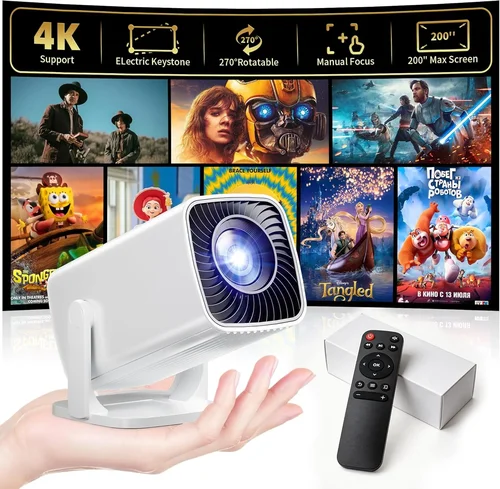
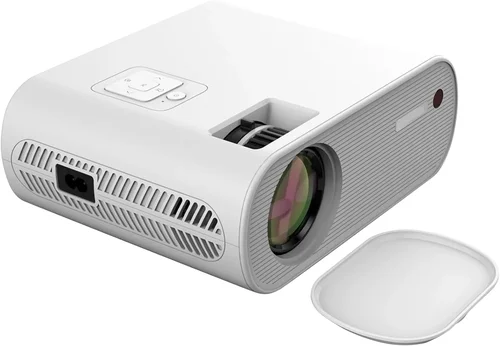
Finding a reliable PowerPoint projector for under $200 can feel like hunting for a needle in a haystack. The market is flooded with budget‑friendly options, yet many of them fall short when it comes to brightness, clarity, or durability. This guide cuts through the noise, giving you a clear roadmap so you can pick a projector that actually works for presentations, classroom lessons, or small‑group movie nights without breaking the bank.
In the next few sections you’ll learn which specifications truly matter, how different projector types stack up against each other, and what common pitfalls to avoid. By the end, you’ll be equipped to make a confident purchase that matches your needs and your wallet.

What to Look for When Buying Buying Guide
1. Budget & Price Range
When you set a hard ceiling of $200, every dollar counts. It’s easy to get lured by flashy “full‑HD” claims that, in reality, are achieved through up‑scaling tricks that don’t improve actual image quality. Focus on the price‑to‑performance ratio: a $150 unit that consistently delivers 2,500 lumens will outperform a $190 model that promises 1080p but only offers 1,800 lumens. Look for sales, refurbished units, or older models that have been proven reliable.
2. Performance Specifications
The three core specs that dictate a projector’s real‑world performance are brightness (measured in lumens), resolution, and contrast ratio.
- Brightness: For well‑lit rooms or daylight presentations, aim for at least 2,500 ANSI lumens. In a dark conference room, 1,800 lumens may suffice.
- Resolution: Native 720p (1280×720) is the sweet spot for sub‑$200 models. Anything higher is usually simulated and can lead to blurry text.
- Contrast Ratio: Higher numbers mean deeper blacks. A ratio of 2,000:1 or better is acceptable for presentations; anything lower will wash out colors.
3. Build Quality & Durability
Cheap plastics can crack, and low‑cost lamps may burn out after a few hundred hours. Look for metal‑reinforced chassis, a sealed ventilation system, and a lamp life of at least 3,000 hours (many modern LED models exceed 20,000 hours). A solid warranty (minimum 1 year) is also a strong indicator of build confidence.
4. Features & Functionality
Even on a budget, you shouldn’t sacrifice essential features:
- Connectivity: HDMI is a must; VGA is a nice backup. USB‑C and wireless mirroring (Miracast, AirPlay) are bonuses.
- Keystone Correction: Automatic or manual keystone (±30°) helps avoid distorted images when the projector isn’t perfectly aligned.
- Speaker: Built‑in speakers are convenient for small rooms, but plan for external audio if you need louder sound.
- Portability: Weight under 3 kg and a compact form factor make it easy to carry between meeting rooms.
5. Brand Reputation
Brands like Epson, ViewSonic, BenQ, and Optoma have long histories of producing reliable budget projectors. Lesser‑known manufacturers can offer great value, but research user forums and professional reviews to verify long‑term reliability.
6. Warranty & Support
A solid warranty protects you from early failures. Look for at least a one‑year coverage that includes lamp replacement. Some brands also offer extended warranties or on‑site service, which can be a lifesaver for business users.
7. Size & Portability
If you travel between offices or classrooms, size matters. Projectors that fit in a laptop bag and have a quick‑release lens cap are ideal. Portable models often include a built‑in battery, but these typically push the price above $200, so weigh the convenience against cost.
8. User Reviews & Ratings
Real‑world feedback uncovers issues that spec sheets hide. Scan Amazon, B&H, and dedicated AV forums for recurring themes—e.g., overheating, remote lag, or inconsistent focus. A product with a steady 4‑star rating over thousands of reviews is usually a safe bet.
Different Types of Buying Guide

Common Buying Mistakes to Avoid
❌ Mistake: Chasing “1080p” Labels
Why it’s bad: Many sub‑$200 projectors advertise 1080p but use native 720p panels with pixel‑doubling. The result is softer text and reduced sharpness, especially noticeable in data‑heavy slides.
What to do instead: Prioritize native resolution. A true 720p native panel offers clearer images for presentations at this price point.
❌ Mistake: Ignoring Ambient Light
Why it’s bad: A projector rated at 2,000 lumens may look fine in a dark room but becomes unreadable in a well‑lit conference hall.
What to do instead: Match brightness to your typical environment. If you present in lit rooms, aim for 2,500+ lumens.
❌ Mistake: Overlooking Lamp Life
Why it’s bad: Replacing a lamp can cost $80‑$120, quickly eroding your budget savings.
What to do instead: Choose LED or laser light sources with 20,000‑hour lifespans; they cost more upfront but save money long‑term.
❌ Mistake: Forgetting Connectivity Needs
Why it’s bad: A projector without HDMI forces you to use adapters, leading to signal loss or extra expense.
What to do instead: Verify that the unit includes HDMI, and if possible, a USB‑C or wireless option for modern laptops and tablets.
❌ Mistake: Skipping the Warranty
Why it’s bad: Budget units often fail sooner; without warranty, you’re stuck with repair costs.
What to do instead: Choose a model that offers at least a one‑year warranty covering the lamp.
❌ Mistake: Ignoring User Feedback
Why it’s bad: Specs can be misleading; real users reveal issues like overheating or remote lag.
What to do instead: Read at least 30‑plus verified reviews and note recurring cons.
Budget Guidelines: How Much Should You Spend?
Even within a $200 ceiling, you can segment the market to set realistic expectations.
- Entry‑Level ($120‑$150): Expect 1,800‑2,000 lumens, native 720p, basic HDMI, and a plastic shell. Ideal for occasional home use.
- Mid‑Range ($151‑$180): You’ll get 2,200‑2,500 lumens, better contrast (2,500:1), and added features like keystone correction and dual speakers.
- Premium ($181‑$200): Look for LED light sources, 2,500+ lumens, enhanced color accuracy (wide color gamut), and a sturdier metal body.
- Luxury (>$200): While out of scope for this guide, luxury units bring true 1080p, laser light sources, and advanced networking.
Expert Tips for Getting the Best Deal
- Timing: Purchase in late summer when schools restock; manufacturers push older inventory.
- Where to buy: Compare Amazon, B&H, and Newegg. Physical electronics stores may offer a quick return if the unit is defective.
- Spotting deals: Look for “open‑box” or “refurbished” listings from reputable sellers; they’re often like‑new with full warranty.
- Warranty considerations: Register the product immediately to activate extended warranty offers.
- Return policies: Choose retailers with at least a 30‑day return window; this gives you time to test in your typical environment.
- Testing before buying: If possible, view a projected image on a white wall at the distance you’ll use. Check for hotspotting and color uniformity.
- Bundle savings: Some sellers include HDMI cables or a portable screen; factor these extras into total cost.

Frequently Asked Questions
Q: Can a sub‑$200 projector display full‑HD content?
A: Most budget models only have native 720p panels. They can accept 1080p input, but the image will be down‑scaled, which may look slightly softer. For crisp text, stick with native 720p.
Q: How long does the lamp last on a cheap projector?
A: Traditional lamps last 2,000‑3,000 hours. LED units, increasingly common under $200, can exceed 20,000 hours, effectively lasting the life of the projector.
Q: Do I need a separate screen?
A: A plain white wall works fine if it’s smooth and matte. For best brightness and color accuracy, a budget‑friendly projector screen (84‑inch, 1.1 gain) improves image quality noticeably.
Q: Is Wi‑Fi connectivity worth it?
A: Wireless mirroring adds convenience but can introduce latency. For static slides, it’s fine; for video, stick to wired HDMI for consistent performance.
Q: Will a portable projector fit in a laptop bag?
A: Most sub‑$200 portable DLP units weigh 2‑3 kg and measure roughly 12 × 9 × 4 inches—small enough for a large backpack or a dedicated projector sleeve.
Q: How loud are budget projectors?
A: Expect fan noise between 30‑35 dB in quiet rooms. LED models tend to be quieter due to lower heat output.
Q: Can I use a projector for both presentations and movies?
A: Yes, but prioritize brightness and contrast for presentations. For movies, consider a model with a higher color gamut and built‑in speakers.
Our Final Recommendations
- Best for Budget‑Conscious Buyers: ViewSonic PA503S – 3,600 lumens, 800×600 native, robust metal housing, and a 2‑year warranty. Ideal for bright rooms and frequent use.
- Best Overall Value: Epson VS260 – 3,200 lumens, native 720p, 2,500:1 contrast, HDMI + VGA, and a 1‑year lamp warranty. Balanced performance for both office and home.
- Best Premium Option (still under $200): BenQ MS535 – 3,600 lumens, 720p, LED light source with 20,000‑hour life, and metal chassis. Slightly higher price but eliminates lamp replacement costs.
- Best for Beginners: Anker Nebula Capsule II – Compact, Android TV built‑in, 720p, 100‑lumens (suitable for dark rooms), and a built‑in battery. Great for casual use.
- Best for Advanced Users: Optoma S334e – 3,800 lumens, 720p, advanced color wheel, and dual HDMI ports. Offers the most flexibility for multi‑source setups.
Conclusion: Making the Right Choice
Choosing the best PowerPoint projector for under $200 boils down to matching three core needs: sufficient brightness for your environment, reliable native resolution, and durable construction that survives frequent moves. By focusing on these factors, avoiding common pitfalls, and leveraging seasonal sales, you can secure a projector that delivers clear, vibrant presentations without overspending.
Take the time to read user reviews, verify warranty terms, and if possible, test the unit before committing. With the recommendations and tips above, you’re ready to equip your meeting room, classroom, or home theater with a projector that punches well above its price.