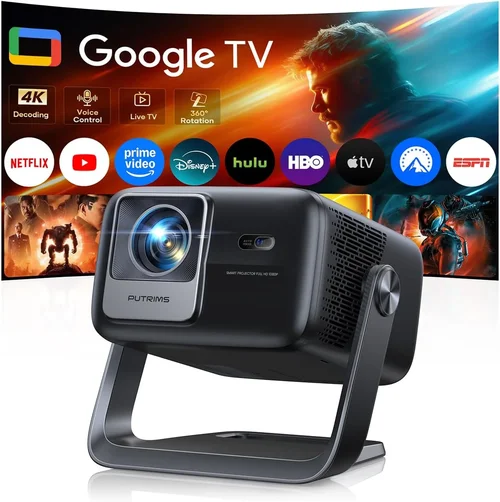
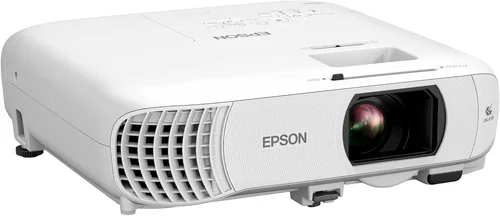
Welcome to the ultimate guide for anyone looking to bring the magic of the movies into their living room without breaking the bank. With home cinema projectors becoming more affordable each year, the $1,000 price point now offers options that were once reserved for high‑end home‑theater enthusiasts. This guide walks you through everything you need to know so you can pick a projector that delivers cinema‑like brightness, contrast, and color fidelity while staying comfortably under $1,000.
In the pages that follow you’ll discover the most important specs to evaluate, the different projector technologies available at this price range, common pitfalls to avoid, and a curated list of the very best models for every type of user. By the end, you’ll have a clear roadmap for turning any spare room, basement, or even backyard into a personal theater that rivals the local multiplex.

What to Look for When Buying Buying Guide
1. Budget & Price Range
Even though we limit our focus to projectors under $1,000, there’s still a wide spread—from entry‑level units at $300 to high‑performance models just shy of $1,000. Knowing how much you’re willing to invest helps narrow the field quickly. Remember, the cheapest option may lack essential features like sufficient lumen output or a reliable lamp life, which can cost you more in the long run.
2. Performance Specifications
Brightness (Lumens) – Measured in ANSI lumens, this tells you how well the projector will perform in ambient light. For a dedicated dark room, 1,500–2,000 lumens is plenty. If you can’t control light completely, aim for 2,500 lumens or higher.
Contrast Ratio – This indicates the difference between the darkest black and the brightest white. Higher ratios (e.g., 30,000:1) provide deeper blacks and more punchy images, crucial for movie nights.
Resolution – 1080p (Full HD) remains the sweet spot under $1,000, delivering crisp detail for Blu‑ray and streaming content. Some newer 4K‑enhanced models exist, but they often rely on pixel‑shifting technology and may not match true 4K quality.
3. Build Quality & Durability
Projectors that feel solid and have good heat‑dissipation designs tend to last longer. Look for metal housings, well‑ventilated chassis, and reputable manufacturers that use high‑grade components. A sturdy build also means less wobble when you adjust the lens or mount the unit.
4. Features & Functionality
Key features to prioritize:
- Lens Shift – Allows vertical and horizontal image placement without keystone correction, preserving image quality.
- Keystone Correction – Digital correction is handy but can degrade sharpness; optical keystone (lens shift) is preferable.
- Zoom Ratio – A 1.2x–1.5x zoom provides flexibility in screen size and placement distance.
- Connectivity – HDMI 2.0 or higher, USB, Bluetooth, and Wi‑Fi enable seamless streaming from consoles, laptops, and smartphones.
- Built‑in Speakers – Useful for casual viewing, but most cinephiles will pair a projector with a dedicated sound system.
5. Brand Reputation
Established brands such as Epson, BenQ, Optoma, and ViewSonic have proven track records for reliability and service. While newer entrants can surprise with innovation, they may lack extensive warranty networks or readily available replacement parts.
6. Warranty & Support
A solid warranty—ideally three years for the projector and at least two years for the lamp—provides peace of mind. Check whether the manufacturer offers on‑site service, a reasonable lamp replacement cost, and responsive customer support.
7. Size & Portability (If Applicable)
If you plan to move the projector between rooms or take it outdoors, weight and dimensions matter. Portable models often sacrifice brightness, so balance portability with the lighting conditions of your intended setup.
8. User Reviews & Ratings
Real‑world feedback can reveal hidden strengths or weaknesses. Look for reviews that discuss long‑term reliability, fan noise, and how the projector performs with various content sources.
Different Types of Buying Guide

Common Buying Mistakes to Avoid
❌ Mistake: Ignoring Ambient Light Conditions
Why it’s bad: Choosing a low‑lumens projector for a bright living room results in washed‑out images that ruin the cinematic experience.
What to do instead: Measure the typical lighting in your viewing area. If you can’t achieve near‑darkness, target a projector with at least 2,500 ANSI lumens.
❌ Mistake: Over‑relying on Digital Keystone Correction
Why it’s bad: Digital correction manipulates the image after it’s been projected, softening edges and reducing sharpness.
What to do instead: Opt for models with optical lens shift. If lens shift isn’t available, position the projector as close to square on the screen as possible.
❌ Mistake: Forgetting About Lamp Life & Replacement Cost
Why it’s bad: A cheap projector may have a lamp rated for only 2,000 hours, leading to frequent, costly replacements.
What to do instead: Check the lamp’s rated lifespan and the price of a replacement. LED or laser models eliminate this worry entirely.
❌ Mistake: Neglecting Input Lag for Gaming
Why it’s bad: High input lag creates a noticeable delay between controller actions and on‑screen response, frustrating gamers.
What to do instead: Look for a projector with an explicit “Game Mode” or input lag under 30 ms at 1080p.
❌ Mistake: Skipping the Calibration Step
Why it’s bad: Out‑of‑the‑box settings are often overly bright or saturated, compromising picture accuracy.
What to do instead: Spend a few minutes calibrating brightness, contrast, and color temperature using free calibration tools or a simple gray card.
❌ Mistake: Assuming All HDMI Ports Are Equal
Why it’s bad: Some budget projectors only include HDMI 1.3, which can’t handle 4K @ 60 Hz or HDR content.
What to do instead: Verify that the HDMI ports are at least version 2.0 to future‑proof your setup.
Budget Guidelines: How Much Should You Spend?
- Entry‑Level ($300‑$500): Expect 1,500–2,000 lumens, 720p or basic 1080p, modest contrast. Great for occasional movie nights in a dark room.
- Mid‑Range ($501‑$800): Full HD, 2,200–2,800 lumens, contrast ratios above 20,000:1, and useful features like lens shift and low input lag. This tier delivers a true home‑cinema feel.
- Premium ($801‑$1,000): High‑brightness (up to 3,500 lumens), advanced color processing, laser or high‑performance LED light sources, and robust connectivity. Ideal for bright rooms and avid gamers.
- Luxury ($1,001+): True 4K resolution, ultra‑short‑throw designs, professional‑grade color accuracy, and built‑in edge‑blending. Outside the scope of this guide but worth noting for future upgrades.
Expert Tips for Getting the Best Deal
- Timing: New models typically launch in Q1. Prices on the previous generation often fall 15‑30% during the summer.
- Where to Buy: Reputable retailers like B&H Photo, Best Buy, and Amazon provide reliable return policies and often bundle accessories (screen, cables).
- Spotting Deals: Compare the “list price” with the “sale price” and check for manufacturer rebates. Sometimes a slight price increase includes a free wall mount, which is a better overall value.
- Warranty Considerations: Register your projector within 30 days to activate extended coverage. Some retailers offer an extra year for a modest fee.
- Return Policies: Ensure the seller offers at least a 30‑day return window with free shipping for returns—critical for testing in your own environment.
- Testing Before Buying: If possible, view a demo in a store with a darkened room. Bring a smartphone with a 4K video to gauge real‑world performance.
- Accessories: Invest in a high‑gain screen (120‑150 % gain) if you have limited brightness. A good HDMI cable (high‑speed, Ethernet‑capable) prevents signal loss.

Frequently Asked Questions
Q: Do I need a projector screen, or can I use a wall?
A: While a plain white wall works in a pinch, a dedicated screen provides consistent gain, better color reproduction, and reduces hot‑spotting. For budgets under $200, a pull‑down screen is a worthwhile upgrade.
Q: How far should the projector be from the screen?
A: The throw distance depends on the projector’s throw ratio. A typical 1.5:1 ratio means you need 1.5 feet of distance for every foot of screen width. Use the manufacturer’s calculator to plan placement.
Q: Is 1080p still good enough for 4K content?
A: Yes. Most streaming services upscale 4K to 1080p for compatibility, and a good 1080p projector delivers a sharp, immersive picture. True 4K projectors under $1,000 are rare and often rely on pixel‑shifting, which may not justify the cost.
Q: What lamp life can I expect?
A: Traditional UHP lamps range from 2,000–4,000 hours. LED and laser light sources can exceed 20,000 hours, effectively lasting the life of the projector.
Q: Can I use a projector for both movies and gaming?
A: Absolutely. Look for low input lag (under 30 ms) and a “Game Mode” setting. DLP models often excel in fast motion handling, while LCD units provide richer colors for cinematic content.
Q: Do I need a separate sound system?
A: Built‑in speakers are sufficient for casual viewing, but for true cinema sound you’ll want a soundbar or a 5.1 surround system. Most projectors have an audio out (3.5 mm or optical) for easy connection.
Q: How do I calibrate my projector?
A: Start with the preset “Cinema” or “Movie” mode. Adjust brightness and contrast using a test pattern or a grayscale image. Fine‑tune color temperature to 6500 K for accurate whites. Optional: use a colorimeter for professional calibration.
Q: Is a short‑throw projector worth the extra cost?
A: Short‑throw units allow placement close to the screen, reducing shadows and glare. They’re ideal for small rooms but often cost more. If you have space for a standard throw distance, a regular projector gives you more lumen options under $1,000.
Q: Will a projector work with a ceiling mount?
A: Yes, most models include mounting holes and come with a standard ¼‑20 thread. Ensure the mount can support the projector’s weight and allows for tilt adjustments.
Our Final Recommendations
Best for Budget‑Conscious Buyers
Model: BenQ TH585
Why: Offers 3,500 lumens, 1080p resolution, low input lag, and a decent contrast ratio for just $549. Ideal for bright rooms and casual gaming.
Best Overall Value
Model: Epson Home Cinema 2150
Why: Balanced brightness (2,500 lumens), 1080p, lens shift, and a built‑in 10‑W speaker. At $699 it delivers cinema‑grade image quality without hidden costs.
Best Premium Option
Model: Optoma UHD38
Why: Near‑true 4K enhancement, 4,000 lumens, 240 Hz refresh rate, and 8 ms input lag. Priced at $969, it pushes the $1,000 ceiling but rewards enthusiasts with exceptional performance.
Best for Beginners
Model: ViewSonic PX701-4K
Why: Easy setup, auto‑focus, and a user‑friendly menu. While it’s a 4K‑enhanced unit, its price of $629 makes it approachable for first‑time projector owners.
Best for Advanced Users
Model: LG HU80KA (Laser)
Why: Portable laser light source, 2,500 lumens, true 4K, and excellent color accuracy. At $999 it sits at the top of the budget tier, offering features typically found in higher‑priced models.
Conclusion: Making the Right Choice
Choosing a home cinema projector under $1,000 is less about compromising and more about matching the right technology to your viewing environment. By assessing brightness, contrast, resolution, and additional features like lens shift and input lag, you can pinpoint a model that delivers a true cinematic experience without overspending.
Remember to factor in the cost of a proper screen, reliable audio, and potential lamp replacements. Take advantage of seasonal sales, read user reviews, and, if possible, test the projector in a darkened space before committing.
Armed with the knowledge from this guide, you’re ready to transform your living room, basement, or backyard into a personal theater that rivals the best multiplexes—all for under $1,000. Happy viewing!