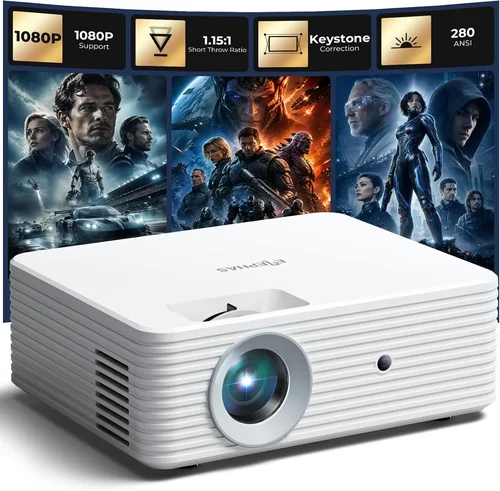
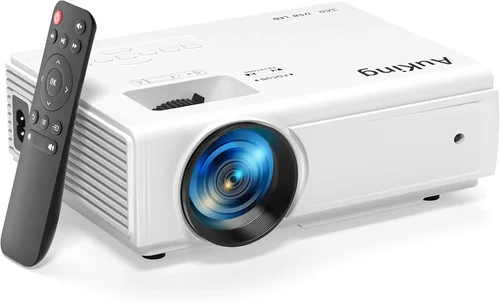
Finding a reliable mini projector for presentations without blowing your budget can feel like searching for a needle in a haystack. The market is flooded with gadgets that promise cinema‑grade visuals, yet many of them fall short when you need crisp text and consistent brightness in a conference room. This guide cuts through the hype, giving you a clear roadmap to pick the best mini projector for presentations under $200.
By the end of this article you’ll understand which specs truly matter for business use, how different projector types stack up against each other, and which models give you the most bang for your buck. Whether you’re a freelancer who needs to wow clients in a coffee shop or a small‑business owner looking for a portable backup to your meeting‑room setup, the insights here will help you make a confident, informed purchase.
The mini projector space has evolved dramatically over the past three years. LED light engines have replaced traditional lamps, battery life has stretched to over two hours, and Android‑based operating systems now let you stream directly from the device. All of these advances mean you can find a capable presentation projector for under $200—if you know what to look for. Let’s dive into the essential factors that separate the winners from the pretenders.

What to Look for When Buying Buying Guide
1. Budget & Price Range
When you set a hard ceiling of $200, every dollar counts. The sweet spot usually lands between $130 and $189, where manufacturers can afford a decent LED source, a basic optics package, and at least one useful connectivity option. Below $130, you’ll often encounter projectors that sacrifice brightness, resolution, or build quality, making them more suitable for dimly lit rooms or casual movie nights rather than professional presentations.
2. Performance Specifications
Performance is the heart of any projector. For presentations, focus on three core specs:
- Resolution: Aim for at least 1280×720 (720p). While 1080p models exist under $200, they are rare and often compromise on brightness.
- Brightness (ANSI lumens): 200–300 lumens is the minimum for a dimly lit conference room. Anything lower will struggle with ambient light.
- Contrast Ratio: A higher contrast (e.g., 2000:1) ensures text stands out against backgrounds, reducing eye strain.
3. Build Quality & Durability
Mini projectors travel a lot, so they need a sturdy chassis. Look for:
- Aluminum or high‑grade ABS housing that resists cracks.
- Protective rubberized corners to absorb bumps.
- Dust‑proof vents—especially important if you’ll be using the projector in a hallway or outdoor setting.
4. Features & Functionality
Beyond the basics, certain features can turn a decent projector into a workflow powerhouse:
- Wireless connectivity: Wi‑Fi or Bluetooth for screen mirroring from laptops, tablets, or smartphones.
- Multiple ports: HDMI is a must; USB‑C or USB‑A adds flexibility for media playback.
- Built‑in speakers: While not a substitute for a dedicated sound system, a 2‑3 W speaker can handle voice‑over audio in a small room.
- Battery life: At least 2 hours of continuous use gives you a buffer for longer meetings.
5. Brand Reputation
Established brands like Anker, ViewSonic, and AAXA have a track record of post‑sale support and firmware updates. Newer entrants may offer attractive specs at lower prices, but research their warranty policies and read community forums before committing.
6. Warranty & Support
Even the best hardware can develop faults. A minimum 1‑year warranty is standard; some brands extend to 2 years for an extra fee. Check whether the warranty covers battery degradation—a common failure point in portable projectors.
7. Size & Portability
Weight under 1 lb and dimensions that fit in a standard laptop bag are ideal for on‑the‑go professionals. Some models even include a built‑in stand or a magnetic base for quick setup on metal surfaces.
8. User Reviews & Ratings
Finally, scan user reviews on Amazon, Best Buy, and specialized forums like r/Projectors. Look for recurring themes—such as overheating, remote‑control lag, or firmware bugs—rather than isolated complaints.
Different Types of Buying Guide

Common Buying Mistakes to Avoid
❌ Mistake: Choosing the Cheapest Model
Why it’s bad: Low‑cost units often skimp on brightness and have poor heat management, leading to dim images and a short lifespan.
What to do instead: Set a realistic minimum of $130 and prioritize brightness and resolution over optional features you won’t use.
❌ Mistake: Ignoring Ambient Light Conditions
Why it’s bad: A projector that looks great in a dark home theater can be unreadable in a well‑lit office.
What to do instead: Measure the typical lighting in your presentation space and aim for at least 200 ANSI lumens.
❌ Mistake: Overlooking Battery Degradation
Why it’s bad: Batteries lose capacity quickly; a projector advertised with 2‑hour runtime may drop to 1 hour after six months.
What to do instead: Choose a model with replaceable battery packs or a strong warranty covering battery wear.
❌ Mistake: Forgetting About Connectivity Options
Why it’s bad: Without the right ports, you’ll need adapters, which adds clutter and potential points of failure.
What to do instead: Confirm the projector has HDMI (or HDMI‑C) and at least one USB‑C or USB‑A port for direct media playback.
❌ Mistake: Assuming All Mini Projectors Are Plug‑and‑Play
Why it’s bad: Some units require firmware updates or specific driver installations to work with certain laptops.
What to do instead: Check the manufacturer’s website for driver support and read user reviews about compatibility with Windows, macOS, and ChromeOS.
Budget Guidelines: How Much Should You Spend?
Below is a quick tiered breakdown to help you align expectations with price.
- Entry-Level ($120‑$149): Expect 720p resolution, 180–220 lumens, basic HDMI, and a modest 1.5‑hour battery. Ideal for one‑off client demos in dark rooms.
- Mid-Range ($150‑$179): You’ll find 720p or entry‑level 1080p, 220–280 lumens, better contrast, and 2‑hour battery life. This tier often includes Wi‑Fi mirroring.
- Premium ($180‑$199): Look for true 1080p, 300 lumens, built‑in Android OS, and a robust battery that can handle 2.5 hours. These models usually have higher-quality lenses and improved heat sinks.
- Luxury ($200+): While outside the strict $200 limit, some sales bring luxury models into range. Expect 1080p, 350+ lumens, advanced keystone correction, and premium build.
Expert Tips for Getting the Best Deal
- Timing is everything: Major sales events (Black Friday, Cyber Monday, and back‑to‑school) often feature mini projectors at their lowest price points.
- Shop the refurbished market: Certified refurbished units from the manufacturer can save you 20‑30% while still carrying the original warranty.
- Bundle for savings: Some retailers offer a bundle with a portable screen or extra battery pack for a modest additional cost.
- Check return policies: A 30‑day return window lets you test the projector in your actual work environment.
- Read the fine print on battery specs: Look for “continuous use” versus “runtime”—the latter may be measured at low brightness.
- Consider third‑party accessories: A quality HDMI‑to‑USB‑C adapter can improve compatibility with newer laptops.
- Leverage credit‑card rewards: Some cards offer extended warranty protection or cash‑back on electronics purchases.

Frequently Asked Questions
Q: Can a mini projector under $200 display clear text?
A: Yes, provided it offers at least 720p resolution and a contrast ratio of 2000:1 or higher. Brightness is also crucial—200 ANSI lumens is the practical minimum for readable text in a dimly lit conference room.
Q: Do I need a separate screen?
A: Not always. A plain white wall works in low‑light conditions, but a portable matte‑white screen improves image uniformity and reduces hotspotting, especially in brighter rooms.
Q: How long will the battery last over time?
A: Most lithium‑ion batteries lose 20‑30% capacity after 300 charge cycles. Expect a gradual decline; many users replace the battery after 1‑2 years for a small fee.
Q: Is Wi‑Fi mirroring reliable for business presentations?
A: Modern mini projectors with dual‑band Wi‑Fi (2.4 GHz + 5 GHz) handle screen mirroring well, but a wired HDMI connection remains the most stable option for high‑resolution content.
Q: Can I use a mini projector with a laptop that only has USB‑C?
A: Absolutely—look for a projector with a USB‑C input or use a high‑quality USB‑C‑to‑HDMI adapter. Ensure the adapter supports 4K/60 Hz if you plan to display high‑resolution media.
Q: What is the difference between LED and DLP mini projectors?
A: LED projectors use a single light source that lasts longer and consumes less power, while DLP projectors employ a tiny chip with millions of mirrors, delivering sharper images and better color accuracy, often at a slightly higher price.
Q: Are built‑in speakers sufficient?
A: For voice‑over or small‑group meetings, a 2‑3 W speaker is adequate. For videos with richer audio, connect external speakers via the 3.5 mm jack or Bluetooth.
Q: How do I clean the lens safely?
A: Use a soft microfiber cloth and a lens‑cleaning solution designed for optics. Avoid using paper towels or harsh chemicals, which can scratch the lens coating.
Our Final Recommendations
- Best for Budget‑Conscious Buyers: Anker Nebula Capsule II (often on sale for $179) – 720p, 200 lumens, 2‑hour battery, Android 9.0 OS, and solid build quality.
- Best Overall Value: ViewSonic M1 Mini Plus ($189) – 720p, 250 lumens, built‑in Harman Kardon speakers, and a sleek portable design.
- Best Premium Option: AAXA P300 Pico ($199) – True 1080p, 300 lumens, 2.5‑hour battery, HDMI and USB‑C, plus a replaceable battery pack.
- Best for Beginners: Vankyo Leisure 3 Mini ($149) – Easy plug‑and‑play, decent brightness, and a user‑friendly remote.
- Best for Advanced Users: BenQ GV1 ($199) – 720p, 200 lumens, Android TV, Wi‑Fi mirroring, and a magnetic base for versatile mounting.
Conclusion: Making the Right Choice
Choosing the best mini projector for presentations under $200 boils down to balancing three core priorities: sufficient brightness for your typical lighting conditions, a resolution that keeps text sharp, and reliable connectivity that matches your devices. By evaluating the factors outlined above, avoiding common pitfalls, and leveraging the budgeting tips, you can secure a projector that feels professional without draining your finances.
Remember, the perfect projector is the one that fits your specific workflow—whether that means a long‑lasting battery for on‑the‑road demos or a robust Android platform for direct streaming. Use the recommendations as a starting point, test the unit in your own environment if possible, and you’ll be ready to deliver compelling presentations wherever you go.
Ready to upgrade your presentation game? Browse the models listed, compare current prices, and make a purchase that aligns with your needs and budget today.