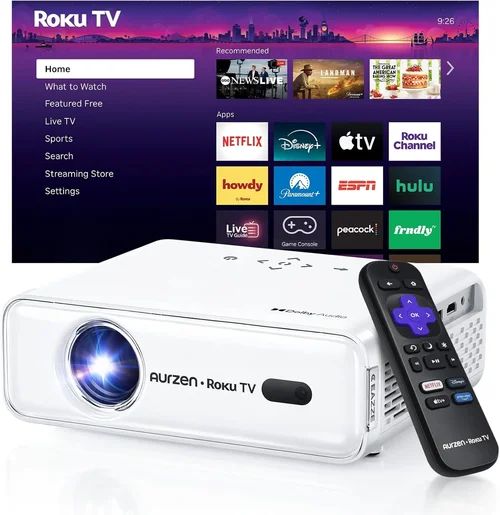
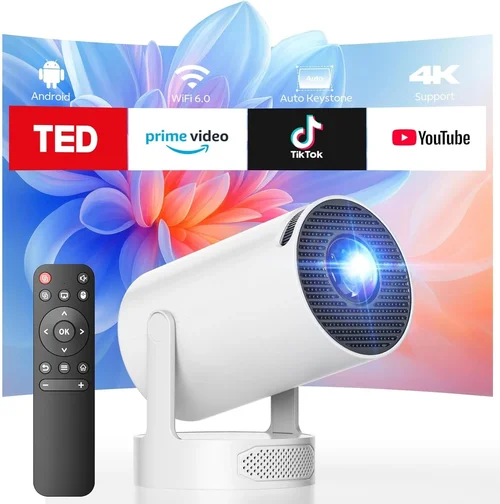
Finding a movie projector that delivers a cinematic experience without breaking the bank can feel like searching for a needle in a haystack. The market is flooded with models that promise “theater‑grade” picture at a price that would make most budgets gasp. That’s why this guide matters: it cuts through the hype, translates technical jargon into everyday language, and equips you with the exact criteria you need to make an informed purchase.
In the next few sections you’ll discover which specifications truly impact picture quality, how different projector types stack up against each other, and where you can stretch every dollar for the best possible image under $300. By the end, you’ll not only know which projector fits your living room or bedroom setup, but you’ll also avoid the common pitfalls that turn an exciting purchase into a regretful one.
The budget projector segment has evolved dramatically over the past three years. LED and laser light sources are now common in the $200‑$300 range, offering longer lifespans and more consistent brightness than older lamp‑based units. Meanwhile, portable “mini” projectors have become powerful enough for small‑room movie nights, and many models now include built‑in Android TV or Roku for streaming without extra cables. This guide reflects those trends and helps you decide which of them align with your viewing habits.

What to Look for When Buying Buying Guide
1. Budget & Price Range
Budget is the first filter because it determines which technologies are realistically available to you. Under $300, you’ll typically find LED or DLP projectors with brightness between 1,500 and 2,500 lumens. Prices can vary due to brand reputation, included accessories (like a remote or mounting kit), and extra features such as wireless screen mirroring. Set a firm ceiling – for example, $250 – and then allocate a small portion (around 10‑15%) for accessories or a warranty extension.
2. Performance Specifications
Performance boils down to three core specs: brightness, resolution, and contrast ratio.
- Brightness (lumens): For a dark room, 1,500 lumens is sufficient. If you plan to watch with some ambient light, aim for 2,200 lumens or higher.
- Resolution: Native 1080p (Full HD) is rare under $300, but many budget models use a “1080p‑enhanced” processor that upscales 720p content. If true 1080p is a must, be prepared to stretch toward the top of the range.
- Contrast Ratio: Higher contrast means deeper blacks and more detail in dark scenes. Look for a ratio of at least 2,000:1; anything above 5,000:1 is a bonus in this price segment.
3. Build Quality & Durability
Projectors are often moved from room to room or stored away after use. A robust chassis made from metal or high‑grade plastic reduces the risk of cracks and internal dust ingress. Check for sealed vents, a reliable cooling fan, and a solid lens housing. Models with a metal frame typically last longer, especially if you plan to use the projector frequently.
4. Features & Functionality
Modern budget projectors pack a surprising amount of smart features. Consider the following:
- Built‑in streaming platforms (Roku, Android TV, Amazon Fire) – eliminates the need for an external box.
- Wireless screen mirroring (AirPlay, Miracast, Chromecast) – great for phone or laptop casting.
- Multiple input ports – HDMI, USB‑C, VGA, and audio out give flexibility.
- Keystone correction – helps straighten the image when the projector is off‑axis.
- Lens shift – less common under $300 but useful for precise placement.
5. Brand Reputation
While the brand name isn’t the sole indicator of quality, established manufacturers often provide better firmware updates, more reliable customer service, and readily available replacement parts. In the sub‑$300 arena, brands such as Epson, BenQ, ViewSonic, and Anker (Nebula) have solid track records. Newer entrants like XGIMI and Vankyo can surprise with value, but research their after‑sales support first.
6. Warranty & Support
A longer warranty (at least 2 years) signals confidence from the manufacturer. Check whether the warranty covers the light source, which is the component most likely to need replacement. Some brands offer “extended warranty” plans for a modest fee – weigh this against the cost of a potential lamp or LED module replacement.
7. Size & Portability
If you need a projector that can be stored in a closet or taken on the road, size matters. Mini projectors under 1.5 kg are truly portable, but they may sacrifice brightness. Larger “home‑theater” units provide better picture quality but require a dedicated space and possibly a ceiling mount.
8. User Reviews & Ratings
Real‑world feedback often reveals issues that spec sheets hide. Look for reviews that mention long‑term reliability, fan noise, and ease of setup. Pay particular attention to comments about firmware updates, as frequent updates can improve performance but also indicate initial software shortcomings.
Different Types of Buying Guide

Common Buying Mistakes to Avoid
❌ Mistake: Ignoring Ambient Light Conditions
Why it’s bad: A projector rated at 1,500 lumens looks fantastic in a dark home theater, but the same unit will appear washed‑out in a living room with daylight spilling through windows.
What to do instead: Measure the typical lighting in your viewing area. If you cannot fully darken the room, aim for a projector with at least 2,200 lumens or consider a screen with high gain.
❌ Mistake: Focusing Solely on Resolution
Why it’s bad: Some $299 models advertise “1080p” but actually use a lower‑resolution chip with upscaling, resulting in softer images.
What to do instead: Verify the native resolution in the spec sheet. If you must stay under $300, prioritize true 720p with higher brightness over a “pseudo‑1080p” claim.
❌ Mistake: Overlooking Fan Noise
Why it’s bad: A loud cooling fan can distract from dialogue, especially during quiet scenes.
What to do instead: Check decibel (dB) ratings in reviews. Look for units rated below 30 dB at normal operation, or consider adding a small external fan for better airflow.
❌ Mistake: Forgetting About Throw Distance
Why it’s bad: Placing a projector too close or too far from the screen can produce a distorted image that is either too small or overly pixelated.
What to do instead: Use the projector’s throw ratio chart to calculate the ideal distance for a 100‑inch screen. Many budget models are “short‑throw,” meaning they can sit just a foot away.
❌ Mistake: Neglecting Connectivity Options
Why it’s bad: You might end up buying extra adapters or a streaming stick if the projector lacks HDMI or wireless casting.
What to do instead: List the devices you plan to connect (gaming console, laptop, phone) and ensure the projector offers compatible ports or built‑in streaming.
❌ Mistake: Assuming Warranty Covers the Light Source
Why it’s bad: Some manufacturers only cover the chassis, leaving you to pay for a costly LED or lamp replacement.
What to do instead: Read the warranty fine print. Opt for a model that explicitly includes the light source in the coverage period.
Budget Guidelines: How Much Should You Spend?
Understanding what you get at each price tier helps you set realistic expectations and avoid overspending.
- Entry‑Level ($150‑$200): Expect 720p native resolution, 1,500‑1,800 lumens, basic HDMI input, and limited built‑in speakers. Ideal for casual viewing in a dark bedroom.
- Mid‑Range ($200‑$250): You’ll see brighter LEDs (2,000‑2,300 lumens), better contrast ratios, and often a built‑in streaming OS (Roku or Android TV). Some models offer true 1080p upscaling.
- Premium ($250‑$300): This bracket includes hybrid laser/LED light sources, higher contrast (5,000:1+), more robust connectivity (USB‑C, Bluetooth audio), and advanced keystone or lens‑shift features.
- Luxury ($300+): While beyond the scope of this guide, luxury units push 3,000+ lumens, true 1080p, and premium optics. They are usually found in specialist retailers.
Expert Tips for Getting the Best Deal
- Timing is everything: New models are released in spring; older units drop in price during summer clearance sales.
- Buy from authorized retailers: This ensures the warranty is valid and you can access official support.
- Check bundle offers: Some sellers include a screen, mounting kit, or HDMI cable, which can save $30‑$50.
- Read the return policy: A 30‑day return window lets you test the projector in your own space.
- Consider refurbished: Certified refurbished units often come with a full warranty at a 15% discount.
- Test before you buy: If possible, view a demo in a store. Pay attention to color vibrancy, black levels, and fan noise.
- Negotiate extended warranty: Some retailers will add a year of coverage for a small fee when you purchase accessories.

Frequently Asked Questions
Q: Can I use a budget projector in a well‑lit living room?
A: Yes, but you’ll need a model with at least 2,200 lumens and a high‑gain screen (gain 1.2‑1.5). Ambient light will still affect contrast, so dimming curtains helps.
Q: Do LED projectors need lamp replacements?
A: No. LED light sources last 20,000‑30,000 hours, effectively outlasting the projector itself. This is a major advantage over traditional lamp‑based units.
Q: Is a 1080p “enhanced” projector worth the extra cost?
A: Enhanced 1080p uses software to upscale 720p content. The result is sharper than native 720p but not true 1080p detail. If you watch mostly streaming services that already deliver 1080p, a true 1080p projector is preferable.
Q: How far should I place a projector for a 100‑inch screen?
A: Most budget DLP projectors have a throw ratio of 1.2‑1.5. For a 100‑inch diagonal (≈88‑inch width), you’d need 3.5‑4.5 feet of distance. Short‑throw models can achieve the same size from 1‑2 feet.
Q: Will a projector work with my gaming console?
A: Absolutely, as long as the projector has an HDMI 1.4 or higher port. Look for a model with low input lag (under 30 ms) if you plan to game competitively.
Q: Do I need a separate sound system?
A: Built‑in speakers in budget projectors are usually 2‑5 W and suitable for small rooms. For a true home‑theater feel, add a soundbar or Bluetooth speaker.
Q: How often should I clean the projector lens?
A: Dust can build up quickly. Use a soft microfiber cloth and a lens‑cleaning solution once every 2‑3 months, or more frequently if the projector is in a dusty environment.
Our Final Recommendations
- Best for Budget‑Conscious Buyers: Vankyo Leisure 3 Mini Projector – $169. Offers 2,400 lumens, 720p native resolution, and HDMI/USB‑C inputs. Ideal for dorms and small apartments.
- Best Overall Value: BenQ TH585 – $289. True 1080p, 3,500 lumens (often found on sale under $300), low input lag, and a solid 10,000‑hour LED lamp.
- Best Premium Option: Anker Nebula Capsule II – $299. Compact laser projector with Android TV, 720p resolution, 720 lumens (bright enough for dark rooms), and a built‑in 8 W speaker.
- Best for Beginners: Epson VS260 – $199. Simple plug‑and‑play, 3,300 lumens, and a user‑friendly remote. No advanced settings required.
- Best for Advanced Users: XGIMI Horizon Pro – $299. 1080p, 2,200 lumens, built‑in Android TV, and advanced keystone correction. Great for those who want flexibility without extra accessories.
Conclusion: Making the Right Choice
Choosing the best movie projector under $300 boils down to balancing brightness, resolution, and extra features against your viewing environment and how often you plan to use the device. Start by assessing ambient light, screen size, and connectivity needs. Then narrow your list using the eight key factors outlined above, avoid the common mistakes, and apply the expert tips to secure the best price.
Remember, the perfect projector isn’t the one with the highest specs on paper; it’s the one that fits seamlessly into your space, budget, and entertainment habits. Use this guide as a roadmap, test a few models if you can, and you’ll be set for countless movie nights that feel like a private cinema.