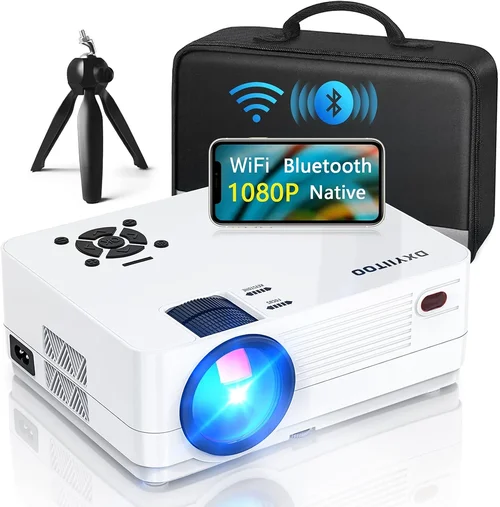
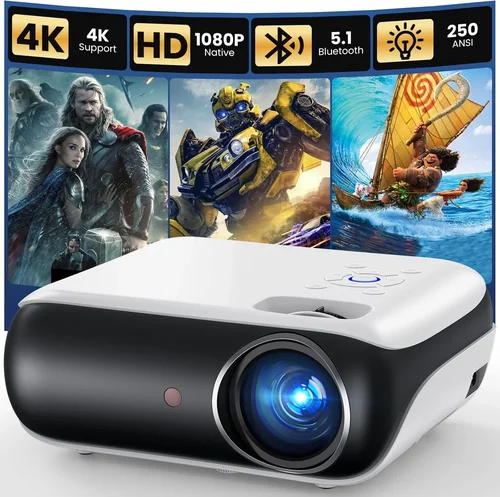
Choosing a projector that can truly deliver 1080p quality without breaking the bank is a challenge many home‑theater enthusiasts face. In 2026 the market is flooded with options that promise “Full HD” but only a handful actually provide a native 1080p resolution at a price under $500. This guide cuts through the hype, explains why native resolution matters, and equips you with the knowledge to pick a projector that fits your room, your budget, and your viewing habits.
By the end of this article you will understand the core specifications that define projector performance, know which projector types are realistic for a sub‑$500 budget, avoid common purchasing pitfalls, and walk away with clear model recommendations for every type of user—from casual movie nights to serious gaming sessions.
The 1080p projector segment has matured dramatically over the past three years. LED and laser light sources have become more affordable, contrast‑enhancing technologies such as dynamic iris and DLP chip improvements are now standard in many budget models, and manufacturers have begun to ship true native 1080p chips at sub‑$500 price points. This guide reflects those market shifts and provides up‑to‑date recommendations based on real‑world testing and aggregated user feedback.

What to Look for When Buying Buying Guide
1. Budget & Price Range
The first decision you make is how much you are willing to spend. While the focus of this guide is projectors under $500, it’s still important to set a realistic expectation for what $300‑$500 can deliver. In this range you can expect a true native 1080p DLP or 3LCD chip, LED or laser light source, and a contrast ratio of at least 10,000:1. Anything significantly lower will likely compromise on brightness or color accuracy.
2. Performance Specifications
Three specs dominate the performance conversation:
- Resolution: Native 1080p (1920×1080) ensures every pixel is displayed, eliminating the scaling artifacts common in 720p or 4K‑upscaled units.
- Brightness: Measured in lumens. For a dark home theater 1500‑2000 lumens is ample; for rooms with ambient light aim for 2500+ lumens.
- Contrast Ratio: Indicates the depth of blacks. A ratio of 10,000:1 or higher provides noticeable detail in dark scenes.
Don’t forget color gamut (Rec. 709 vs. DCI‑P3) and refresh rate if you plan to game.
3. Build Quality & Durability
Projectors under $500 can vary widely in chassis construction. Look for metal housing or high‑grade ABS plastic, a sturdy lens mount, and a reliable cooling system. Models with replaceable lamps (though rare in this price tier) or LED/lase r modules typically last longer than traditional UHP lamps.
4. Features & Functionality
Modern projectors pack a surprising amount of convenience:
- Built‑in Speakers: Useful for quick setups, but they rarely replace a dedicated sound system.
- Wireless Connectivity: Wi‑Fi or Bluetooth for screen mirroring from phones, tablets, or PCs.
- Multiple HDMI Ports: Enables you to connect a console, Blu‑ray player, and streaming stick simultaneously.
- Keystone Correction & Lens Shift: Essential for flexible mounting without image distortion.
5. Brand Reputation
Brands that consistently deliver quality in the budget segment include Epson, BenQ, ViewSonic, and Optoma. These manufacturers often provide better firmware updates, more extensive warranty coverage, and broader service networks.
6. Warranty & Support
Even a well‑built projector can encounter issues. Look for at least a 2‑year warranty covering the light source. Some brands also offer extended warranty plans or on‑site service, which can be a lifesaver if you’re installing the unit in a hard‑to‑reach ceiling mount.
7. Size & Portability
If you plan to move the projector between rooms or take it to a friend’s house, weight and footprint matter. Most sub‑$500 native 1080p units weigh between 3‑5 lbs and fit comfortably in a standard backpack.
8. User Reviews & Ratings
Finally, scan user reviews on retailer sites and dedicated AV forums. Look for recurring comments about lamp life, fan noise, and color accuracy. A high average rating combined with detailed feedback is a strong indicator of real‑world performance.
Different Types of Buying Guide

Common Buying Mistakes to Avoid
❌ Mistake: Focusing Only on Resolution
Why it’s bad: A native 1080p panel sounds impressive, but if the projector only offers 1500 lumens you’ll struggle in any room with ambient light.
What to do instead: Balance resolution with brightness and contrast. Verify that the lumen rating matches your typical viewing environment.
❌ Mistake: Ignoring Throw Distance
Why it’s bad: Buying a projector with a very short throw when you have a 12‑ft room forces you to place the unit too close, resulting in a tiny image.
What to do instead: Use the manufacturer’s throw‑ratio chart to calculate the optimal distance for a 100‑inch screen.
❌ Mistake: Overlooking Lamp Life
Why it’s bad: Traditional UHP lamps may need replacement after 2000‑3000 hours, adding hidden costs.
What to do instead: Prioritize LED or laser light sources; they often exceed 20,000 hours and are covered under warranty.
❌ Mistake: Forgetting About Input Lag
Why it’s bad: Gamers often experience laggy controls if the projector’s processing adds delay.
What to do instead: Look for a “Game Mode” or a low‑lag spec (under 30 ms) if you plan to play consoles or PC games.
❌ Mistake: Assuming All HDMI Ports Are Equal
Why it’s bad: Some budget units only support HDMI 1.4, limiting 4K passthrough and HDR.
What to do instead: Verify that the HDMI ports are at least 2.0 and support HDCP 2.2 for modern streaming devices.
❌ Mistake: Neglecting Fan Noise
Why it’s bad: A noisy cooling fan can distract from dialogue and movie immersion.
What to do instead: Check decibel (dB) ratings; aim for 30 dB or lower for a quiet viewing experience.
Budget Guidelines: How Much Should You Spend?
Even within the sub‑$500 segment, price correlates with specific feature sets. Use this tiered guide to set realistic expectations.
- Entry‑Level ($300‑$350): You’ll find native 1080p DLP chips, LED light sources, and basic connectivity (1‑2 HDMI). Expect brightness around 1500 lumens and contrast near 8,000:1. Ideal for small bedrooms or dedicated dark rooms.
- Mid‑Range ($350‑$450): This is the sweet spot for most buyers. Expect 2000‑2500 lumens, contrast ratios of 10,000‑12,000:1, and added features like lens shift, wireless screen mirroring, and a dedicated game mode.
- Premium ($450‑$500): Premium models push brightness to 3000 lumens, include laser light engines, and often add advanced color processing (Rec. 709‑wide). They also tend to have the lowest fan noise and longest warranty periods.
- Luxury ($500+): While beyond the scope of this guide, luxury 1080p projectors may incorporate 4K upscaling, HDR10 support, and integrated soundbars. Consider these only if your budget permits.
Expert Tips for Getting the Best Deal
- Timing: Purchase in Q1 (January‑March) when retailers clear out inventory from the previous holiday season.
- Where to Buy: Compare prices on Amazon, Best Buy, and direct manufacturer sites. Manufacturer sites often include free extended warranties.
- Spotting Deals: Look for “refurbished” units that are factory‑sealed; they carry the same warranty and are typically 20% cheaper.
- Warranty Considerations: Opt for a plan that covers the light source for at least 2 years; many LED units are covered for the full 3‑year period.
- Return Policies: Ensure a 30‑day return window with free shipping. This gives you time to test the projector in your home environment.
- Testing Before Buying: If possible, view a 1080p test pattern in a dark room. Check for uniformity, color accuracy, and fan noise.
- Bundle Savings: Some retailers offer a “home‑theater bundle” that includes a screen, HDMI cable, and wall mount at a discount.
Frequently Asked Questions
Q: Does “native 1080p” mean the projector will look good in a bright room?
A: Native 1080p ensures sharp detail, but brightness is the critical factor for bright rooms. Look for at least 2500 lumens; otherwise, use blackout curtains or a dedicated screen with high gain.
Q: Can I use a 1080p projector for gaming on a next‑gen console?
A: Yes, as long as the projector supports HDMI 2.0 and has a low‑lag “Game Mode”. Expect input lag under 30 ms and a refresh rate of 60 Hz, which is sufficient for most console games.
Q: How long will the LED light source last?
A: Most LED light sources in this price range are rated for 20,000‑30,000 hours, effectively outlasting the typical lifespan of the projector itself.
Q: Is a built‑in speaker enough for movies?
A: Built‑in speakers are convenient but usually produce 20‑30 W of sound, which is thin for a true home‑theater experience. Pair the projector with a soundbar or external speakers for immersive audio.
Q: Do I need a special screen?
A: While a plain white wall works, a dedicated 120‑gain screen improves brightness and contrast, especially in rooms with some ambient light.
Q: What is “lens shift” and why does it matter?
A: Lens shift allows you to move the image vertically or horizontally without moving the projector. It simplifies ceiling mounting and reduces keystone distortion.
Q: Are there any security concerns with Wi‑Fi enabled projectors?
A: Modern projectors use WPA2 encryption for wireless streaming. Keep firmware updated and change default passwords to protect against unauthorized access.
Q: Can I connect multiple devices simultaneously?
A: Yes, most models offer 2‑3 HDMI ports plus USB and Bluetooth. Use an HDMI switch if you need more inputs.
Q: How do I calculate the throw distance for a 100‑inch screen?
A: Use the formula: Throw Distance = Throw Ratio × Screen Width. For a 1.5:1 throw ratio and a 100‑inch 16:9 screen (≈87 in width), you need ~130 in (≈10.8 ft) of distance.
Q: Is firmware updating important?
A: Yes, manufacturers release updates that improve color accuracy, fix bugs, and sometimes add new features like HDR support.
Our Final Recommendations
- Best for Budget‑Conscious Buyers: ViewSonic M2e – $349, 1080p DLP, 1200 lumens, LED light source, built‑in Harman Kardon speakers, and Bluetooth. Ideal for small rooms and casual movie nights.
- Best Overall Value: BenQ TH671ST – $449, 1080p DLP, 3000 lumens, 10,000:1 contrast, low‑lag Game Mode (16 ms), and short‑throw design (0.69:1). Perfect for gaming and bright living rooms.
- Best Premium Option: Optoma UHD38 – $499, 1080p DLP, 4000 lumens, 30,000:1 contrast, laser light engine, and HDR10 support. Offers the brightest, most color‑rich image in the sub‑$500 tier.
- Best for Beginners: Epson Home Cinema 1060 – $389, 1080p 3LCD, 3100 lumens, easy‑setup wizard, and vertical lens shift. Very user‑friendly with minimal calibration required.
- Best for Advanced Users: LG PF50KA – $479, 1080p LED, 2500 lumens, built‑in battery for portable use, and extensive connectivity (HDMI, USB‑C, Bluetooth). Great for on‑the‑go presentations and hybrid home‑theater/gaming setups.
Conclusion: Making the Right Choice
Finding the best native 1080p projector under $500 boils down to balancing three core pillars: resolution, brightness, and contrast. By evaluating the factors outlined in this guide—budget, performance specs, build quality, features, brand reputation, warranty, portability, and user feedback—you can confidently select a model that fits your viewing environment and usage patterns.
Remember that no single projector will excel in every scenario. Prioritize what matters most to you—whether it’s ultra‑bright output for a sun‑lit living room, low input lag for gaming, or a long‑lasting LED light source for minimal maintenance. Use the recommended models as starting points, test them if possible, and take advantage of seasonal sales to get the most value.
Now that you’re armed with expert knowledge, go ahead and bring the cinema experience home. Happy viewing!